How to Do a Website Audit: The Complete Step-by-Step Guide

Artificial Intelligence
September 23, 2026
According to crawl data analyzed across tens of thousands of domains, more than 68% of commercial websites suffer from critical crawl barriers, broken canonical chains, or unindexed revenue-generating URLs that owners have no idea exist. You can spend months writing authoritative content and securing tier-one press mentions, but if search engine crawlers encounter rendering bottlenecks or redirect loops, that work produces zero search visibility.

Understanding how to do a website audit begins by diagnosing five foundational layers: technical crawlability, on-page intent alignment, structural internal linking, off-page authority, and user experience telemetry. An audit is not a vanity checklist that spits out a hundred-page PDF of generic warnings; it is an architectural diagnostic designed to isolate why search engines fail to discover, index, and rank your most valuable assets.
The Difference Between Automated Scans and a Real SEO Audit
Most people's first experience with a website audit comes from entering their domain into a free online scanner. Within ninety seconds, the tool generates a bright red dashboard showing an arbitrary "Site Health Score" of 64% alongside three thousand urgent "errors."
When you examine the data, two thousand of those errors are missing image alt attributes on decorative background icons, while eighty pages have meta descriptions three characters over the character limit. Meanwhile, the scanner completely overlooks the fact that your client-side JavaScript hydration drops all internal navigation links on mobile devices, or that your pagination parameters create tens of thousands of duplicate indexable URLs.
A website audit is a comprehensive diagnostic evaluation of a domain's technical health, crawl architecture, on-page relevance, and backlink equity designed to identify underlying bottlenecks that suppress organic search visibility and conversion efficiency.
Automated tools check syntax; a genuine audit analyzes systemic architecture. If an issue does not influence how search bots crawl your site, how algorithms interpret your content, or how real visitors navigate toward a conversion, it does not belong at the top of your roadmap.
| Audit Layer | Automated Scanner Focus | Comprehensive Manual Audit Focus |
|---|---|---|
| Technical SEO | Missing meta tags, image alt text | JavaScript rendering, crawl budget waste, server response times |
| Indexation | XML sitemap presence | Canonical conflicts, noindex leaks, indexation shard distribution |
| Architecture | Flat URL length | Link depth, internal PageRank flow, orphan directory discovery |
| Content | Arbitrary keyword density counts | Semantic coverage, information gain, search intent drift |
| Authority | Domain score vanity metrics | Toxic anchor distribution, historical link decay, competitive gaps |
The 5 Foundational Pillars of a Modern Website Audit
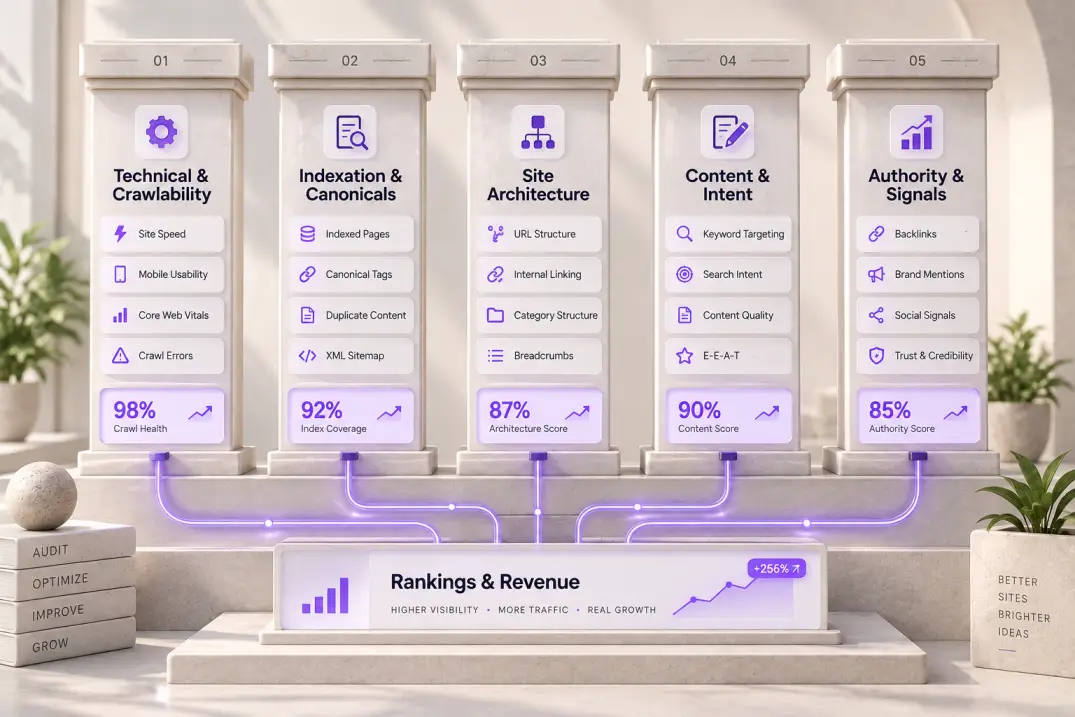
To conduct an audit without drowning in irrelevant data, organize your investigation into five distinct functional pillars. Each pillar addresses a specific operational requirement of search engine algorithms.
- Crawlability and Server Infrastructure: Can search engine bots discover and fetch your resources without exhausting crawl budgets or hitting server errors?
- Indexation and Canonicalization: Are search engines indexing the exact canonical version of each page you intend to rank, while ignoring faceted navigation, parameter variations, and staging environments?
- Site Architecture and Internal Link Graph: Does your internal linking distribute authority down to deep, high-intent service pages, or are critical URLs stranded past crawl depth four?
- On-Page Semantic Intent and Content Quality: Does each page solve the user's underlying search problem with original information gain, or does your domain suffer from internal keyword cannibalization?
- Off-Page Authority and Technical Signals: How resilient is your link profile, and are localized or international signals properly configured through structured data, local directories, or hreflang tags?
This structural breakdown prevents you from getting lost in tactical weeds. If you uncover six hundred 404 errors during your crawl, you do not fix them one by one; you trace the link source to identify whether an obsolete navigation menu or broken footer widget is broadcasting broken URLs across your entire domain.
Step 1: Technical Crawling and Rendering Diagnostics
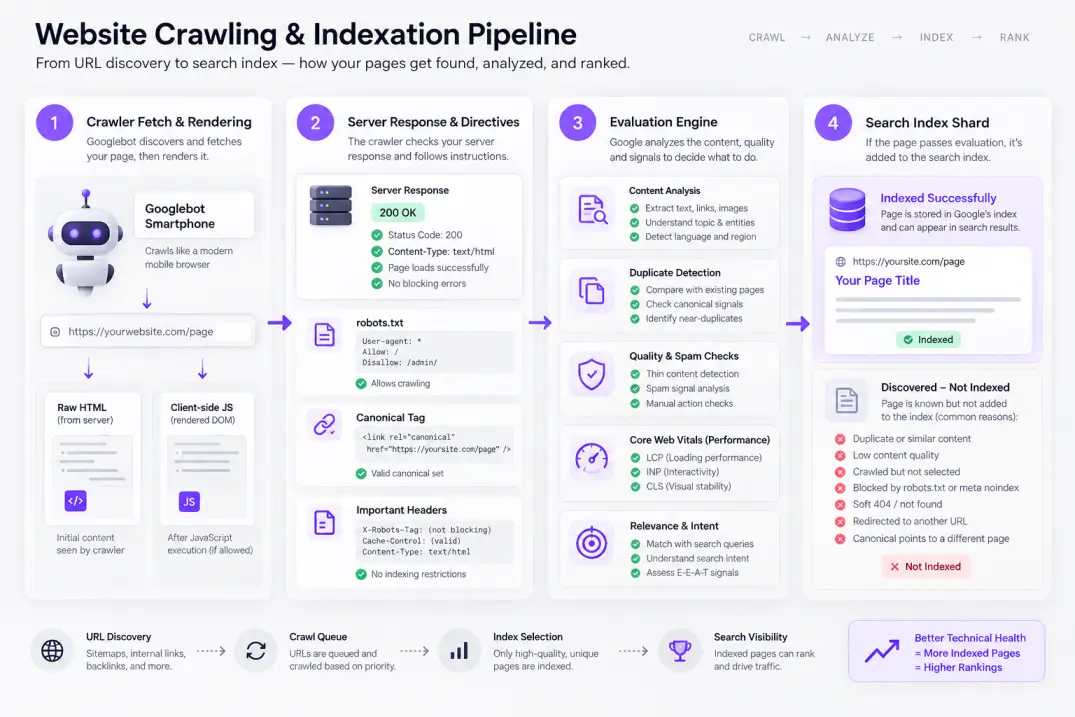
Before analyzing keywords or backlinks, verify that search engine crawlers can physically fetch and render your web pages. When search engines cannot parse your site, nothing else matters.
Configuring an Enterprise-Grade Crawl
Run an initial crawl using desktop software like Screaming Frog SEO Spider or cloud-based crawlers such as Sitebulb or Ahrefs. Do not accept default settings. To replicate how Googlebot interacts with modern web applications, adjust your crawler settings:
- User-Agent Switching: Set your crawler's user-agent to Googlebot Smartphone. Google indexes websites using mobile-first crawling; evaluating your desktop DOM will miss mobile-only layout shifts and hidden menus.
- JavaScript Rendering: If your frontend relies on frameworks like React, Vue, Next.js, or Nuxt, enable JavaScript rendering in your crawler. Compare the raw server HTML against the rendered DOM to confirm that critical internal links, headings, and body content render reliably without timing out.
- Respect or Ignore Robots.txt: Run your first crawl respecting
robots.txtto see what Googlebot can view today. Run a second diagnostic crawl ignoringrobots.txtto uncover legacy directories or staging subfolders that might be leaking into search results.
Status Codes, Redirect Chains, and Server Latency
Filter your crawl data by HTTP status codes. A healthy production site should serve clean 200 OK responses across all primary navigation, sitemap entries, and internal links.
Look specifically for redirect chains and loops. A redirect chain occurs when URL A points to URL B, which then redirects to URL C. Every hop introduces server latency, consumes bot processing budgets, and dilutes link equity. Export all 301, 302, and 307 status codes, then update internal links to point directly to the final 200 OK destination.
Next, examine your server response times (Time to First Byte, or TTFB). According to Google's performance guidelines outlined on web.dev, a TTFB under 800 milliseconds is essential for optimal crawl efficiency. If your server regularly takes two to three seconds to deliver initial HTML, search bots will automatically reduce their crawl rate to avoid crashing your infrastructure.
Pointing XML sitemaps to redirected URLs (301s) or non-canonical variations forces search engines to expend double the crawl requests just to discover your actual canonical content. Always ensure every URL listed in your sitemaps returns a direct 200 OK status.
The Core Web Vitals and Page Experience Check
Page performance directly affects crawl efficiency and user retention. Focus on the three Core Web Vitals metrics:
- Largest Contentful Paint (LCP): Measures perceived loading speed. The primary above-the-fold content block must render within 2.5 seconds.
- Interaction to Next Paint (INP): Measures interface responsiveness. Page interactions must register within 200 milliseconds.
- Cumulative Layout Shift (CLS): Measures visual stability. Content must not unexpectedly jump during load, maintaining a score below 0.1.
Review real-user field data in Google Search Console's Core Web Vitals report rather than relying solely on synthetic lab scores from Lighthouse. Synthetic lab audits test single pages on idealized connections; field data reflects actual user experiences across varying devices and mobile networks.
Step 2: Indexation and Canonicalization Health
Discovering a page is only half the battle; Google must decide that the page deserves a place in its index. Navigate to the Pages report inside Google Search Console to examine how the search engine categorizes your URLs.
Diagnosing Search Console Exclusion Categories
Evaluate the URLs grouped under the Excluded tab. These statuses highlight algorithmic and structural roadblocks:
- Discovered – currently not indexed: Google knows the URL exists, but has not yet allocated resources to crawl it. This usually points to site-wide quality issues, an overloaded server, or an excessively bloated URL structure.
- Crawled – currently not indexed: Google fetched and rendered the page, but chose not to index it. This is almost always an information-quality signal. The page may offer thin content, duplicate another internal page, or provide negligible value.
- Duplicate without user-selected canonical: Multiple URLs share identical or near-identical content without explicit
rel="canonical"tags directing bots to the primary version.
Inspect your canonical link declarations. Every page must contain a self-referential canonical tag unless it is an intentional duplicate, variant, or syndicated reprint. If URL parameters from ad tracking (?utm_source=...) or facet filters (?sort=price_asc) are generating unique URLs, ensure their canonical tags point cleanly to the clean root URL.
For an in-depth breakdown of canonical override signals and how search algorithms reconcile conflicting index directives, review our guide on canonical tag issues.
XML Sitemap and Robots.txt Validation
Verify that your XML sitemap operates as a clean indexation blueprint rather than an uncurated dumping ground. Your sitemap should only contain indexable 200 OK URLs. It must never contain URLs blocked by robots.txt, URLs tagged with noindex, redirected links, or canonicalized duplicates.
Test your robots.txt file in Google Search Console's Robots Testing tool to verify that important CSS, JavaScript, and image assets are not inadvertently blocked. If Googlebot cannot access your stylesheet or rendering scripts, it cannot assess mobile usability or dynamic page layouts.
Step 3: Site Architecture, Crawl Depth, and Internal Linking
Search algorithms rely heavily on link structure to determine the relative importance of each URL on your website. Even exceptional content will fail to rank if it sits buried five clicks deep with zero inbound internal links.
Crawl Depth and Click Distance
Calculate the crawl depth (or click distance) of every indexable URL during your site crawl. Crawl depth represents the minimum number of clicks required to navigate from the homepage to a target page.
- Depth 1–2: Homepage and top-level categories. These receive maximum authority.
- Depth 3: Core subcategories, primary product pages, and pillar content. Ideal for high-intent search terms.
- Depth 4+: Deep blog archives, obscure tags, or buried pages. Pages located at depth 4 or higher experience significantly lower crawl frequencies and struggle to rank for competitive terms.
If critical revenue-producing service pages or high-value articles sit past depth 3, restructure your global navigation, breadcrumb navigation, and contextual in-body links to pull them closer to the root domain.
Identifying and Fixing Orphan Pages
An orphan page is a page with zero internal links pointing to it from anywhere else on the site. Search engines can only discover orphan pages through XML sitemaps or external backlinks. Because they lack internal link equity, search engines treat them as isolated, low-priority assets.
To identify orphan pages, cross-reference your crawler's internal link report with two external data sources:
- Google Search Console / Google Analytics: Pull all URLs that generated at least one click or session over the past six months.
- Your Complete XML Sitemap: Export every live URL registered in your CMS.
When a URL appears in your analytics data or sitemap but registers zero incoming internal links in your site crawl, you have isolated an orphan page. You then have three choices: integrate it into relevant topic hubs using contextual internal links, redirect it to an active parent page if it is obsolete, or remove it entirely.
For a technical dive into diagnosing isolated nodes and managing crawl budget waste through log files, consult our walkthrough on crawl log file analysis.
+-------------------------------------------------------------------------+
|                   INTERNAL LINK GRAPH AUDIT MATRIX                      |
+-------------------------------------------------------------------------+
| Metric             | Target Threshold | Warning Flag    | Action Plan   |
|--------------------+------------------+-----------------+---------------|
| Crawl Depth        | Max 3 clicks     | 4+ clicks deep  | Add category  |
|                    | from homepage    | from root       | & breadcrumbs |
| Incoming Links     | 5-15 relevant    | Under 3 inbound | Insert contextual
|                    | contextual links | internal links  | hub links     |
| Anchor Diversity   | Descriptive,     | Exact-match     | Vary anchor   |
|                    | varied phrases   | spam or generic | text naturally|
| Broken Links (404) | 0 broken internal| Any internal    | Update to live|
|                    | hyperlinks       | 4xx link        | 200 OK target |
+-------------------------------------------------------------------------+
Internal Link Equity Distribution
Evaluate the anchor text and placement of your internal links. Links located inside the main body copy pass significantly more contextual relevance than links relegated to sidebars or footers. Make sure your anchor text is descriptive; avoid vague phrases like "click here" or "read this post."
Modern content teams frequently automate these structural link graphs to prevent maintenance debt. For example, platforms like Qoreta automatically maintain internal link health and audit citation structures during draft generation, preventing orphan pages and broken link chains before manual quarterly audits are even scheduled.
To understand how strategic link hierarchies distribute authority and avoid link cannibalization, read our complete guide on internal linking architecture.
Step 4: How to Use Claude for SEO Audits
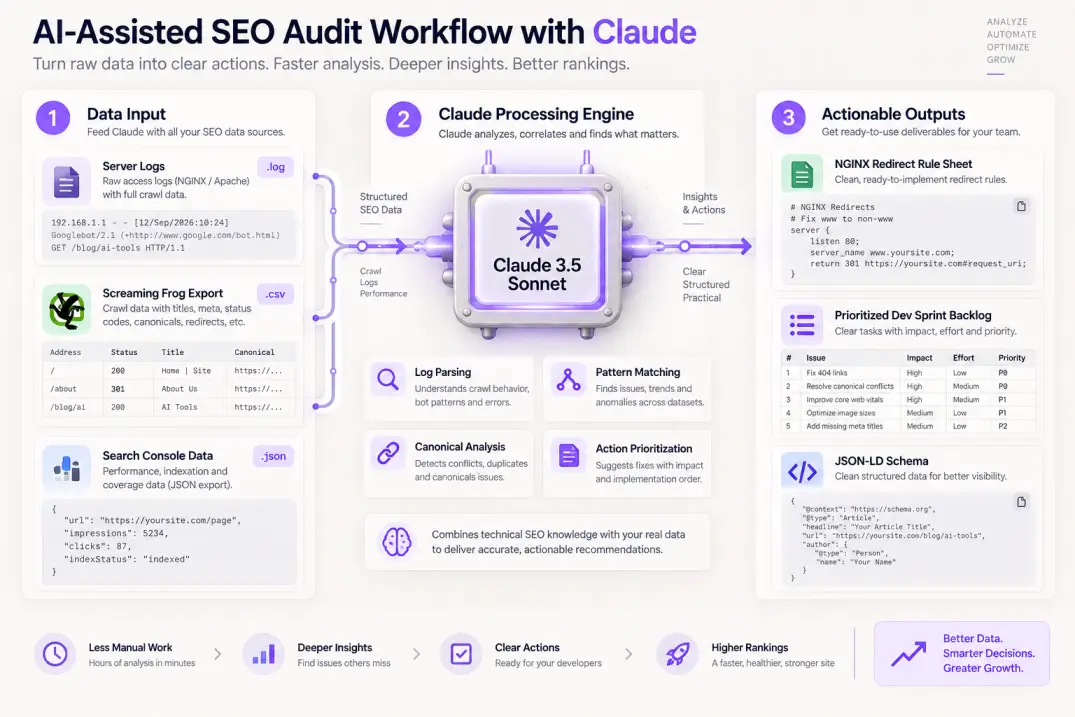
AI models have transformed website audits from manual spreadsheet sorting into rapid, intelligent pattern recognition. Knowing how to use claude for seo audits allows technical marketers and consultants to process massive log files, parse raw crawl extracts, and generate remediation code in minutes.
Claude 3.5 Sonnet's large context window and strong reasoning capabilities make it uniquely suited for technical SEO diagnostics. Below are four high-impact use cases with exact prompt frameworks you can use immediately.
Use Case 1: Server Access Log Analysis for Crawl Budget Anomalies
Manual log file analysis requires custom Python scripts or costly enterprise log analyzers. You can feed sampled log extracts directly into Claude to detect bot behavior patterns, status code anomalies, and crawl budget waste.
System: You are an enterprise technical SEO engineer specializing in server log analysis.

Task: Analyze the following sample of 1,000 Apache access log entries. Identify:
1. The distribution of Googlebot Smartphone vs. desktop crawl requests.
2. URLs returning 4xx or 5xx status codes to Googlebot.
3. Non-revenue URL parameters consuming bot requests (e.g., facet filters, search queries).
4. Average server response time (TTFB) trends for crawl requests.

Format your output as a prioritized bulleted summary followed by an NGINX redirect/block snippet if parameter waste is detected.

[PASTE RAW LOG EXTRACT HERE]
Claude will immediately summarize which directories soak up disproportionate bot hits, isolating whether search engine crawlers are spending precious budget fetching infinite calendar pagination or faceted product filters.
Use Case 2: Detecting Keyword Cannibalization from Crawl Exports
Export your crawl spreadsheet containing columns for URL, Page Title, Meta Description, H1, and primary ranking keyword data from Google Search Console. Feed the CSV data to Claude with the following prompt:
System: You are an advanced search strategist reviewing a site for keyword cannibalization.

Task: Review the provided dataset of URLs, Page Titles, and Target Queries. Identify pairs or groups of URLs that target identical search intent or share overlapping primary semantic entities.

For every cannibalization conflict detected:
1. Specify URL A and URL B.
2. Highlight the overlapping search intent.
3. Recommend an action: 301 Redirect/Consolidate, Canonicalize, or Differentiate (with specific new topical angles for each page).

[PASTE CSV DATA HERE]
This diagnostic pinpoints instances where two pages split clicks and impressions, allowing you to merge thin articles into comprehensive topic hubs.
When prompting Claude to generate structured data, always supply the official Schema.org specifications or ask it to validate the JSON-LD against Google's Rich Results documentation. This guarantees syntax compatibility and prevents entity mapping errors.
Use Case 3: Generating Complex Schema Markup and Canonical Rules
Instead of writing complex nested JSON-LD schema by hand, use Claude to transform raw page content into fully compliant structured data conforming to Schema.org standards. Supply the raw text of an author bio, service offering, or FAQ section, and request structured data that links entities together using @graph arrays.
Step 5: How to Execute a Local SEO Audit
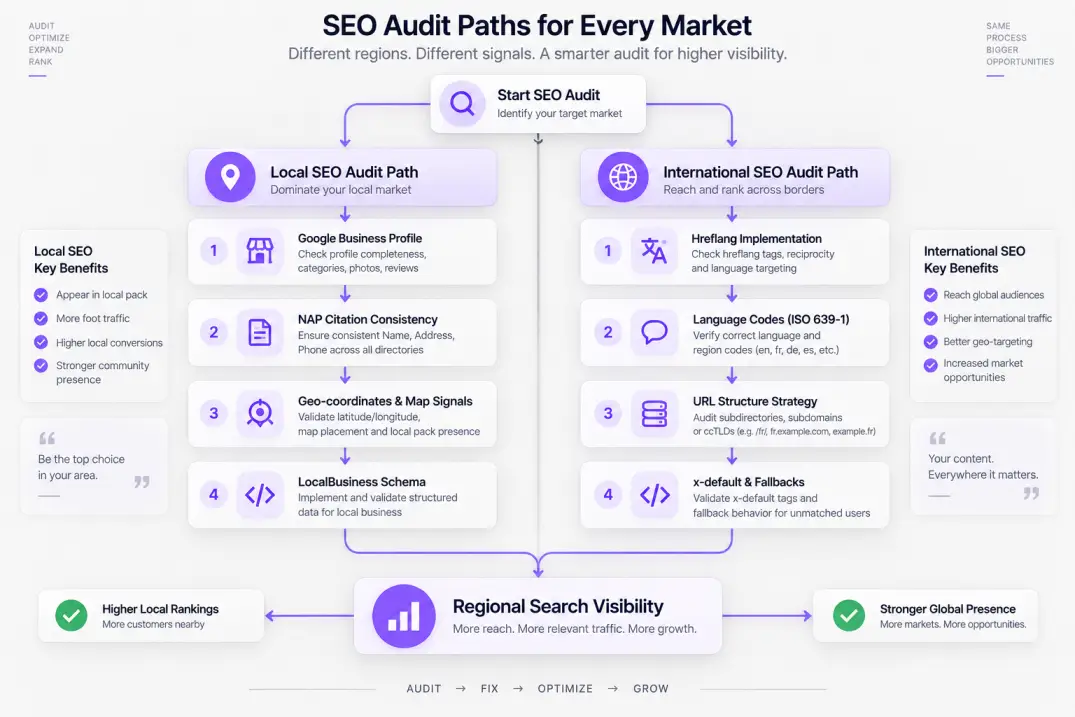
If you manage a business serving physical territories or regional markets, a standard technical audit addresses only half the equation. A comprehensive local seo audit evaluates the geographic signals that determine whether your business appears in Google's Local 3-Pack and Google Maps.
Local search algorithms rely on three fundamental ranking principles defined by Google: Relevance, Distance, and Prominence. Your audit must systematically inspect each area.
Google Business Profile (GBP) Configuration
Your Google Business Profile represents your primary local entity. Verify every critical configuration setting:
- Primary Business Category: Your primary category carries more ranking weight than any other field. If you run an immigration law practice, setting your category to generic "Lawyer" rather than "Immigration Attorney" immediately puts you at a ranking disadvantage.
- Secondary Categories: Audit your secondary categories against the top-ranking competitors in your metro area. Utilize tools like PlePer or GMBDumper to extract competitor category structures.
- NAP Consistency: Your Name, Address, and Phone number (NAP) displayed on your Google Business Profile must mirror the exact text on your website's contact page and footer.
- Geo-Coordinates and Service Areas: Ensure pin markers rest on your actual physical location and that designated service area radiuses do not overlap erratically across multiple locations.
Local Citation Cleanliness and Directory Data
Inconsistent citations confuse search engines regarding your true business location. Run a citation diagnostic across primary data aggregators (Data Axle, Neustar Localeze, Foursquare) and key consumer platforms (Yelp, Apple Maps, YellowPages, Bing Places).
Identify duplicate listings, outdated suite numbers, legacy phone numbers from previous VoIP providers, and spelling variations of your company name. Suppressing duplicate listings and updating incorrect citations across tier-one directories restores algorithmic confidence in your geographic profile.
On-Page Geo-Targeting and Localized Schema
Inspect how your website supports your local listings. Every physical location needs a dedicated, uniquely written location page. A strong local landing page includes:
- Embedded Google Map matching the exact GBP pin.
- Complete NAP information matching the GBP profile.
- Tailored client testimonials mentioning specific neighborhoods, towns, or landmarks.
- Detailed driving directions or service radius descriptions.
- Valid
LocalBusiness(or specific subtype such asLegalService,MedicalBusiness, orPlumbingService) structured data.
{
  "@context": "https://schema.org",
  "@type": "LegalService",
  "name": "Apex Legal Partners",
  "address": {
    "@type": "PostalAddress",
    "streetAddress": "100 South State Street, Suite 400",
    "addressLocality": "Chicago",
    "addressRegion": "IL",
    "postalCode": "60603",
    "addressCountry": "US"
  },
  "geo": {
    "@type": "GeoCoordinates",
    "latitude": 41.881832,
    "longitude": -87.627914
  },
  "telephone": "+1-312-555-0198",
  "url": "https://example.com/chicago-office/"
}
Step 6: How to Execute an International SEO Audit
When a website targets users across multiple countries or languages, an international seo audit is vital to ensure that users in France see French content, while users in the United Kingdom see British English pricing rather than US Dollar defaults.
Evaluating Hreflang Tag Implementation
Hreflang annotations are notoriously prone to errors. An international audit must test four common failure points:
- Missing Return Tags (Reciprocal Links): If page A (en-US) points to page B (es-ES) as its Spanish alternate, page B must contain a return link pointing back to page A. If the return tag is missing, search engines ignore both annotations.
- Incorrect Language and Country Codes: Hreflang requires ISO 639-1 format for languages and ISO 3166-1 Alpha-2 format for regions (e.g.,
en-GBfor British English, noten-UK). Specifying non-standard codes invalidates the tag. - Self-Referential Tags: Each localized page must include a self-referential hreflang tag matching its own URL.
- Conflicting Canonical and Hreflang Directives: The canonical tag of a localized alternate page must point to itself, not to the global English default. Pointing an
es-ESpage's canonical tag to anen-USURL tells Google to index only the English version, completely nullifying your translation investment.
URL Structure for International Domains
Review the architectural model chosen for international expansion. Compare your setup against the three search-compliant options:
- ccTLDs (example.de, example.fr): Strongest local geo-targeting signal, but fragments domain authority across completely separate backlink profiles.
- Subdirectories (example.com/de/, example.com/fr/): Consolidates all domain authority under one root domain; easiest to manage and crawl; generally the superior approach for most businesses.
- Subdomains (de.example.com, fr.example.com): Separates authority, increases DNS management overhead, and risks crawl isolation. Avoid unless distinct regional server hosting is mandatory.
Step 7: Content Quality, Intent Drift, and Information Gain
Once technical crawling and geographic configurations are verified, evaluate your content assets. Modern search algorithms, particularly following Google's Helpful Content systems and core algorithmic updates, penalize domains that publish derivative, thin, or AI-regurgitated articles.
Identifying Content Decay and Search Intent Drift
Content decay occurs when an article that previously commanded top-three rankings steadily loses search traffic over six to twelve months. In your audit, cross-reference historical performance data from Google Search Console:
- Compare the last 6 months of clicks and impressions against the prior 6-month period.
- Filter for queries that dropped three or more ranking positions.
- Manually inspect the current live SERP for those lost queries.
Often, the ranking drop is caused by search intent drift. A query that originally required a high-level conceptual guide might now demand an interactive calculator, a downloadable template, or a side-by-side comparison table. If your content format no longer matches what users want, search engines will demote your page in favor of more relevant formats.
Auditing for Information Gain
Google maintains patents dedicated to evaluating "Information Gain"—measuring whether a document provides novel, additive information beyond what existing ranked documents already contain. If your blog post simply summarizes the top five pages on Google using different phrasing, it offers zero information gain.
During your audit, evaluate your top-priority URLs using this three-part standard:
- First-Party Data and Case Studies: Does the content cite original research, customer metrics, proprietary experiments, or real-world testing?
- Unique Visual Frameworks: Does the page contain custom diagrams, architectural workflows, or original video breakdowns instead of generic stock photography?
- Direct Answers Up Front: Does the post answer the reader's core query within the first two paragraphs, or does it force visitors to scroll through five hundred words of historical background?
Pages failing these standards should be scheduled for content refreshes, enriched with proprietary data, or consolidated into higher-performing comprehensive guides.
When to Hire an Expert: Evaluating SEO Audit Services
For enterprise platforms, e-commerce stores with millions of dynamic URLs, or marketing teams lacking technical engineering resources, conducting a comprehensive audit in-house can prove challenging. At this stage, organizations frequently turn to outside specialists.
Choosing Between an SEO Audit Consultant and SEO Audit Companies
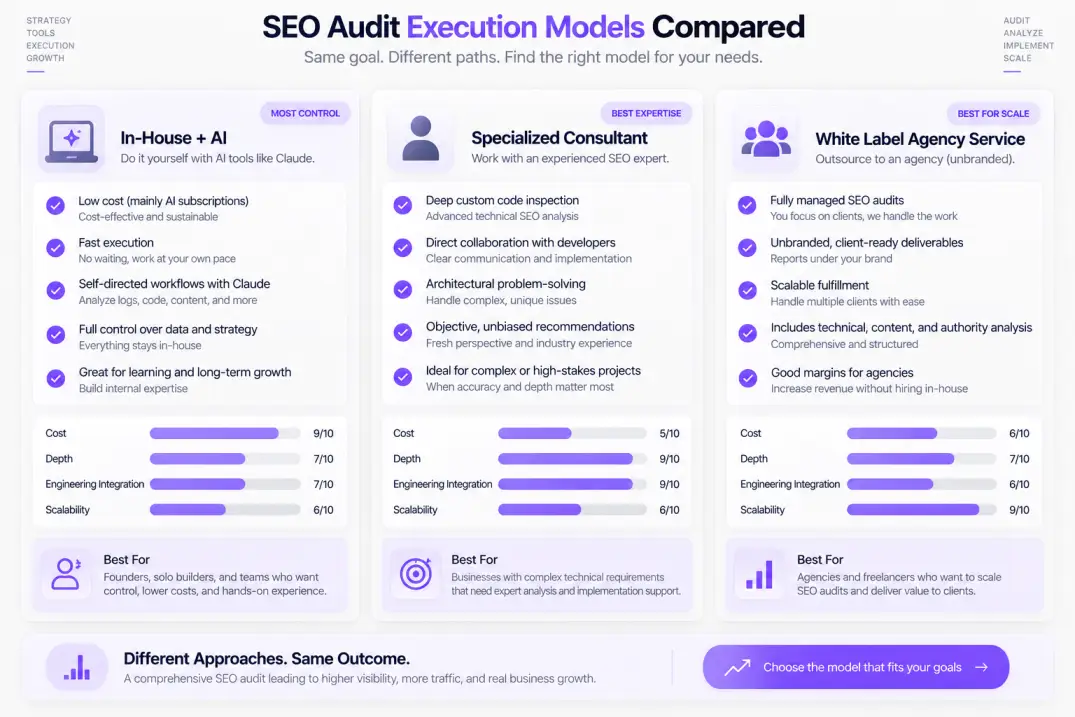
When sourcing external guidance, evaluate whether your challenges require an independent seo audit consultant or specialized seo audit companies:
- Independent SEO Audit Consultant: Best suited for high-level architectural strategy, complex migrations, and bespoke troubleshooting. An experienced consultant works directly alongside your engineering and product leads, cutting through agency bureaucracy to provide direct advisory guidance.
- Full-Service SEO Audit Companies: Ideal for enterprise brands needing multi-disciplinary execution—spanning technical web developers, content strategists, digital PR specialists, and dedicated project managers who can implement changes directly.
When vetting a provider for an in-depth technical seo audit service, demand sample deliverables. Reject providers who merely forward raw exports from automated tools. A genuine professional service delivers prioritized, engineering-ready tickets with explicit reproduction steps, expected business impact, and developer code snippets.
+-------------------------------------------------------------------------+
|                   AUDIT PROVIDER SELECTION MATRIX                       |
+-------------------------------------------------------------------------+
| Need Profile           | Recommended Model       | Key Deliverable      |
|------------------------+-------------------------+----------------------|
| Enterprise Architecture| Senior Independent      | Architectural spec,  |
| & Platform Migrations  | SEO Consultant          | Dev sprint tickets   |
| Multi-brand Conglomerate| Full-Service Enterprise | End-to-end audit,    |
| Ongoing Optimization   | SEO Audit Companies     | Content roadmaps     |
| Digital Marketing      | White Label SEO         | Unbranded, client-   |
| Agencies Scaling Up    | Audit Provider          | ready client decks   |
| Bootstrapped Startups  | Guided In-House Audit   | Actionable 30-day    |
| & Small Sites          | with Free Tools & Claude| priority checklist   |
+-------------------------------------------------------------------------+
The Reality of the "Free SEO Consultation"
Many agencies advertise a free seo consultation or automated free scan as an inbound sales magnet. While these offers can provide a helpful high-level overview of basic errors, recognize their limitations.
A free consultation rarely includes deep log file analysis, client-side JavaScript rendering checks, or comprehensive entity gap evaluations. Treat free consultations as an exploratory baseline to gauge an agency's technical expertise—not as a substitute for a rigorous, paid seo auditing service.
The Agency Playbook: Scaling with White Label SEO Audits
For digital marketing agencies, web design shops, and IT consultancies, delivering comprehensive technical audits for every prospective client creates a major operational bottleneck. Conducting thirty-page architectural audits requires specialized senior talent that smaller agencies cannot always afford to keep on full-time payroll.
This operational challenge has fueled significant demand for a white label seo audit partner or dedicated white label seo audit tool.
How Agencies Structure White Label Fulfillment
Utilizing an seo audit white label model enables generalist agencies to offer enterprise-grade diagnostics under their own brand name. Fulfillment typically takes one of two shapes:
- Software-Driven White Label Platforms: Utilizing enterprise platforms that generate fully customized, unbranded, or agency-branded diagnostic portals. These tools crawl client sites, apply customizable issue severity scoring, and export clean, executive-ready presentations complete with the agency's logo and color palette.
- Bespoke Technical Partner Fulfillment: Partnering with an external technical seo audit service that operates behind the scenes. Senior technical specialists perform the actual manual investigations, review server logs, test headless rendering, and compile prioritized developer backlogs. The agency then delivers the report directly to the end client.
This structure enables growing agencies to pitch and win enterprise clients, providing high-value technical roadmaps without burdening their internal team.
Prioritizing Findings: The ICE Framework for Technical SEO
An audit that ends with a four-hundred-item list of unstructured issues is an audit that never gets implemented. Developers and product managers will look at the massive spreadsheet, feel overwhelmed, and push the entire project to next quarter's backlog.
To translate your audit into action, prioritize every finding using the ICE Framework (Impact, Confidence, Ease). Score each issue on a scale from 1 to 5:
- Impact: How significantly will resolving this issue improve crawl efficiency, indexation, or rankings? (1 = negligible aesthetic fix; 5 = unblocking a primary revenue section from indexing).
- Confidence: How certain are you that this specific fix will yield the intended performance improvement? (1 = speculative theory; 5 = proven industry standard with verified Search Console data).
- Ease: How simple is implementation from an engineering and resource perspective? (1 = complex multi-month database refactor; 5 = simple NGINX redirect rule or robots.txt line update).
Multiply Impact × Confidence × Ease to generate an ICE Priority Score ranging from 1 to 125. Sort your remediation roadmap by this score.
+-------------------------------------------------------------------------+
|                     SAMPLE ICE REMEDIATION BACKLOG                      |
+-------------------------------------------------------------------------+
| Issue Description           | Impact | Conf. | Ease | Score | Action    |
|-----------------------------+--------+-------+------+-------+-----------|
| Noindex tag on new blog hub |   5    |   5   |  5   |  125  | Sprint 1  |
| 301 Redirect loops on /shop |   5    |   5   |  4   |  100  | Sprint 1  |
| Mobile JS navigation hidden |   4    |   4   |  3   |   48  | Sprint 2  |
| Missing alt text on icons   |   1    |   3   |  5   |   15  | Backlog   |
+-------------------------------------------------------------------------+
By organizing your findings into a clear engineering framework, your website audit shifts from an intimidating document into an actionable sprint plan that builds real search authority.
Artificial Intelligence
Intelligence without limits.
We believe great content deserves honest authorship—even when it's AI.
Frequently Asked Questions
For most active commercial websites, a comprehensive technical and architectural website audit should be conducted bi-annually or quarterly. However, you should run focused micro-audits immediately following major CMS platform updates, site redesigns, or URL restructuring to catch redirect loops and indexation directives before they harm organic rankings.
A technical SEO audit examines backend infrastructure, crawlability, mobile rendering, status codes, and server performance to ensure search bots can fetch and index pages cleanly. A content audit focuses on the on-page material itself, evaluating topical relevance, search intent alignment, keyword cannibalization, and information gain to ensure pages provide unique value.
Yes. You can conduct a powerful, thorough audit using free tools including Google Search Console, Google PageSpeed Insights, Google's Rich Results Test, and free crawler tiers (such as Screaming Frog's 500-URL limit). Pairing these free diagnostic sources with Claude or ChatGPT allows you to analyze server logs and parse data without enterprise software licenses.
This status means Google knows your URL exists (typically via an XML sitemap or internal link), but has chosen not to crawl it yet. This occurs when a website has low domain authority, experiences crawl budget constraints, suffers from slow server response times, or exhibits site-wide thin content issues that discourage deep crawling.
Leading platforms for white-label agency auditing include Sitebulb, Ahrefs Site Audit, Semrush, and SE Ranking. These tools allow marketing agencies to customize crawl parameters, apply their own agency branding and color schemes, and export executive-ready reports that can be delivered directly to prospective clients.
A standard technical audit evaluates site-wide code, rendering, and server responses. A local SEO audit specifically investigates geographic ranking factors: Google Business Profile optimization, localized NAP (Name, Address, Phone) citation consistency across directory aggregators, local review velocity, and localized on-page schema markup.
The two most frequent international errors are missing reciprocal return tags (where page A points to page B, but page B fails to link back to page A) and conflicting canonical declarations (where a localized page points its canonical tag to the global English default instead of having a self-referential canonical tag).
Claude accelerates technical audits by analyzing complex datasets that typically require custom scripting. It can rapidly process raw server access logs to uncover crawl budget anomalies, identify keyword cannibalization across large CSV exports, validate nested JSON-LD schema markup, and generate clean NGINX or Apache redirect rules.
Professional SEO audit pricing varies significantly based on site scale and complexity. Independent SEO audit consultants typically charge between $2,000 and $7,500 for a bespoke diagnostic, while enterprise SEO audit companies handling complex multi-million URL e-commerce or SaaS platforms charge between $10,000 and $30,000+ for end-to-end technical evaluations.
An orphan page is a live URL that has zero incoming internal links pointing to it from other pages on the same website. Because search engines rely on internal links to crawl pages and pass PageRank authority, orphan pages receive minimal crawl frequency, lose topical context, and rarely achieve competitive search rankings.
Google uses mobile-first indexing, meaning its algorithms crawl, render, and rank web pages based almost entirely on the smartphone version. If your desktop site includes full navigation menus and rich content that gets hidden, condensed, or unrendered on mobile devices, Googlebot will ignore that desktop content when determining your search rankings.