KWFinder vs Ahrefs: Which SEO Tool Wins in 2026?

Artificial Intelligence
September 26, 2026
When I started building websites at fifteen, I stared at Ahrefs' checkout page like it was a rent bill I couldn't afford. I had very little cash, zero backlink profile, and an urgent need to find search queries that an unrated domain could actually rank for.

Desperate to avoid spending money on the wrong software, I spent weeks testing both tools side by side, terrified that choosing a budget option would blind me to critical search data.
Here is the direct answer if you need to decide right now: KWFinder is the superior choice if your immediate goal is discovering low-competition, long-tail search terms on an intuitive interface without paying more than fifty dollars a month. Ahrefs is the definitive winner if you run an agency, manage multi-author publications, or need enterprise-grade competitor intelligence, a thirty-five-trillion backlink index, and technical site crawling.
When weighing kwfinder vs ahrefs for keyword discovery, the first question you must answer is whether you need a dedicated search query finder or a full-blown competitive intelligence ecosystem.
Two Fundamentally Different Design Philosophies
Most software comparisons treat these platforms as direct clones of one another, but their architectures reveal opposite philosophies.
KWFinder is designed as a streamlined, high-speed discovery tool. Built by the Slovakian team at Mangools, its entire experience is engineered around reducing cognitive overhead. You enter a seed term, review a single screen of filtered metrics, and walk away with target queries in five minutes.
Ahrefs, on the other hand, began its life in 2010 as a dedicated backlink crawler. Over the past decade and a half, it evolved into a petabyte-scale data warehouse that tracks billions of web pages across multiple global search engines. It does not simply suggest search terms; it maps out the entire structural link graph of the public web.
When evaluating keyword difficulty in any SEO tool, never trust the standalone two-digit number. Always inspect the actual SERP breakdown to check whether page one is occupied by high-authority root domains with zero dedicated content or niche sites with exact-match intent.
This architectural divergence explains why beginners often feel overwhelmed inside Ahrefs and why enterprise SEO directors find KWFinder insufficient for holistic campaign management. One gives you a sharp scalpel for immediate content topics; the other provides an industrial excavator for market dominance.
Keyword Discovery and Database Scale Compared
Database scale dictates whether you discover lucrative long-tail search queries before your competitors do, or merely recycle the same high-volume terms everyone else targets.
Ahrefs boasts a global keyword index containing more than 28 billion search terms across 10 different search engines, including Google, YouTube, Amazon, Bing, and Yandex. This multi-engine indexing is a massive advantage for omnichannel marketers who need to understand how user behavior shifts between e-commerce search boxes and informational search engines.
KWFinder operates on a smaller, curated index of roughly 2.5 billion search queries. While that number is smaller on paper, Mangools sources its core data directly from Google Autocomplete, Google Keyword Planner APIs, and proprietary SERP scraping routines.
For standard Google search optimization in major commercial niches, KWFinder surfaces virtually every relevant long-tail phrase you would practically write about. Where KWFinder begins to thin out is in hyper-niche business-to-business verticals, emerging software terms, and non-English regional markets outside the United States and Western Europe.
| Capability Dimension | KWFinder (Mangools) | Ahrefs (Keywords Explorer) |
|---|---|---|
| Primary Database Scale | ~2.5+ Billion Keywords | ~28+ Billion Keywords |
| Search Engines Supported | Google, YouTube, Amazon, Bing, Yandex, Yahoo, Baidu, Seznam, Naver, Daum | |
| Data Sources | Google Suggest, Keyword Planner, Scraped SERPs | Clickstream Aggregators, Direct Crawlers, Google APIs |
| Traffic Potential Metric | No (Search Volume only) | Yes (Aggregated Top Ranking URL Traffic) |
| Click Behavior Metrics | Basic Search Trends | Paid vs. Organic Clicks, Return Rate, Clicks Per Search |
This is why understanding search volume calculation methods matters just as much as raw database numbers.
Search Volume Nuances: Raw Averages vs. Click Potential
Traditional search volume is one of the most misleading metrics in modern search marketing. A keyword might display 5,000 monthly searches, yet generate fewer than 200 organic clicks because Google answers the query directly via AI Overviews, Featured Snippets, or local map packs.
KWFinder presents search volume as a 12-month historical average alongside a sparkline trend graph. It accurately highlights seasonal spikes—such as fitness queries peaking in January or gardening topics rising in spring—which protects writers from investing in fading trends. However, KWFinder assumes that every search query has commercial click-through potential.
Ahrefs tackles this problem through clickstream data modeling. Inside Keywords Explorer, Ahrefs divides raw search volume into two separate layers: actual search volume and estimated clicks. It tracks "Clicks Per Search" (CPS), revealing whether users click multiple results or exit immediately without visiting a domain.
Even more valuable is Ahrefs' "Traffic Potential" metric. Rather than showing what a single search query yields, it calculates the total organic traffic generated by the top-ranking page across all the secondary keywords that page ranks for. If you focus on targeting secondary keywords, this single metric completely changes how you prioritize topics.
Keyword Difficulty (KD) Formulas Deconstructed
In any technical comparison of ahrefs vs kwfinder, the divergence in their keyword difficulty calculations is the most critical factor content teams overlook.
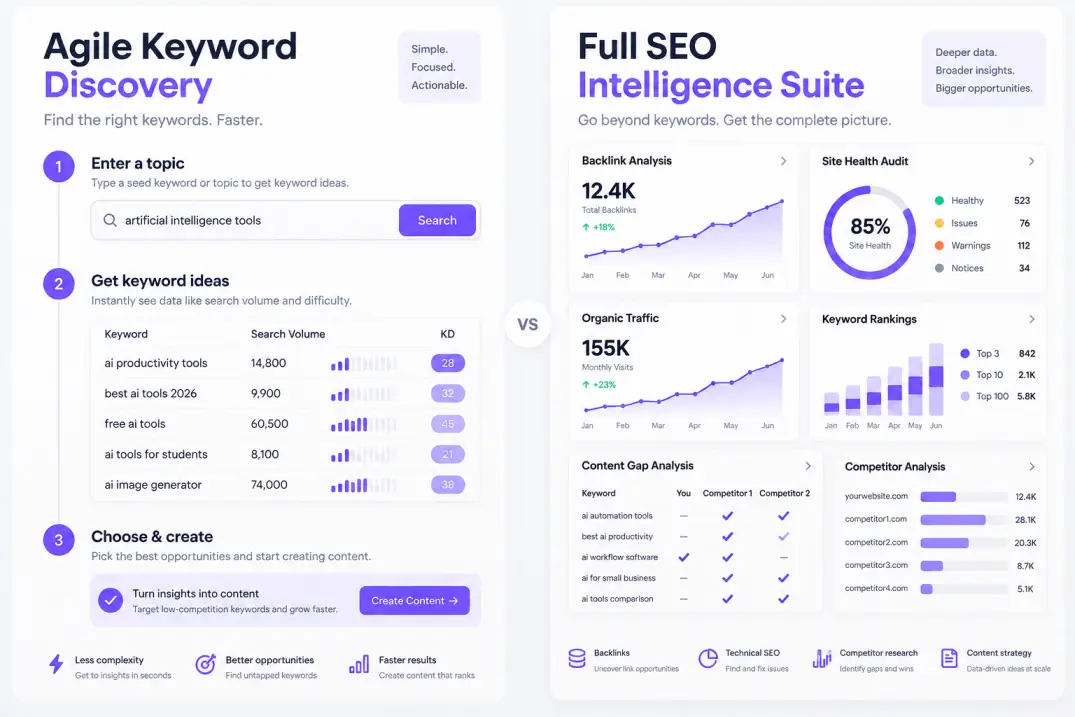
Ahrefs calculates its Keyword Difficulty score on a strict mathematical scale from 0 to 100 based entirely on backlink data. Specifically, it analyzes the number of unique referring domains pointing to the current top 10 search results for that exact query. It does not account for internal linking, on-page optimization, content depth, domain age, or brand authority.
This creates a specific blind spot: a keyword might score a KD of 5 in Ahrefs because the top pages have very few external backlinks, yet those top pages are hosted on massive authority domains like Reddit, Forbes, or Wirecutter. A new site targeting that query will struggle to rank despite the low difficulty score.
# Conceptual representation of Ahrefs KD Logic
Ahrefs_KD = f(Referring_Domains_To_Top_10_Pages)

# Conceptual representation of KWFinder KD Logic
KWFinder_KD = f(Moz_DA, Moz_PA, Majestic_CF, Majestic_TF, SERP_Rank_Weights)
KWFinder takes a composite approach. Its algorithm assesses the Link Profile Strength (LPS) of every URL in the top 10 SERP, pulling metrics derived from Moz Domain Authority (DA), Page Authority (PA), and Majestic Citation Flow and Trust Flow. It then weights those scores according to rank position, giving higher importance to the top three spots.
Upgrading to an enterprise SEO tier before you have the editorial bandwidth to publish consistently is a classic capital trap. Having 35 trillion backlinks in your database creates zero organic traffic if your team only publishes one blog post a month.
Because KWFinder factors domain-level strength into its calculation, its KD scores often run higher than Ahrefs' scores for the same term. An informational query that Ahrefs rates as KD 12 might register as KD 38 in KWFinder because established media domains dominate the first page.
For solo creators and newer websites, KWFinder's conservative difficulty estimate is often safer, preventing authors from targeting queries guarded by unassailable brand authority.
Understanding how search algorithms balance page authority with topical relevance is fundamental to finding low-competition keywords that actually rank.
Competitor Intelligence & Content Gap Analysis
Finding new keywords from scratch is only half the battle. The fastest way to build an organic traffic pipeline is reverse-engineering what already works for your competitors.
KWFinder includes a dedicated "Search by Domain" feature. You enter a competitor's domain or specific URL, select the target country, and the system outputs the top search queries driving traffic to that site. On the Basic plan, you can view up to 25 competitor keywords per lookup, expanding to 2,000 on Premium and Agency tiers.
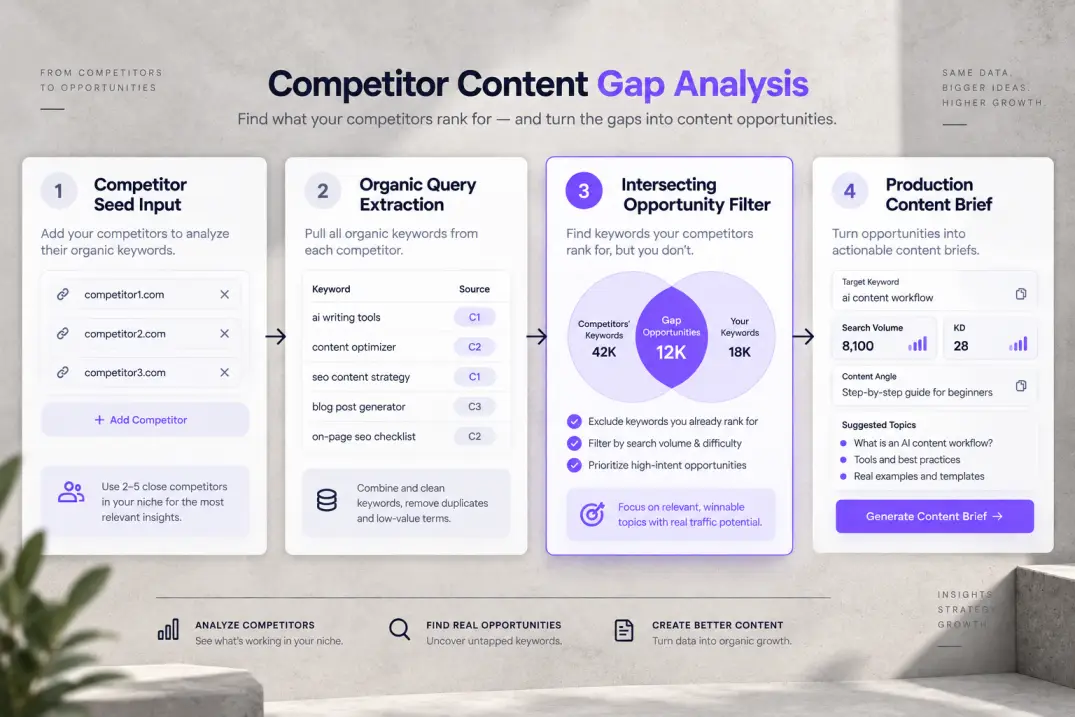
While this feature is great for quick topic ideation, it lacks deep comparative filtering. You cannot easily cross-reference three competitor sites simultaneously to isolate the exact keywords they share that your domain is missing.
Ahrefs sets the gold standard for competitive analysis with its Site Explorer and Content Gap tool. Inside Site Explorer, you can analyze any URL on the internet, inspect historical ranking movements over a ten-year timeline, and review organic search traffic estimates broken down by folder or subpath.
The Content Gap tool allows you to input up to ten competitor domains and compare them against your own site. The system instantly filters for search terms where at least two of your competitors rank in the top 10, but your website has zero presence.
This automated delta analysis is indispensable for enterprise content teams and digital marketing agencies building out complete topical silos.
Backlink Intelligence and Technical Audits
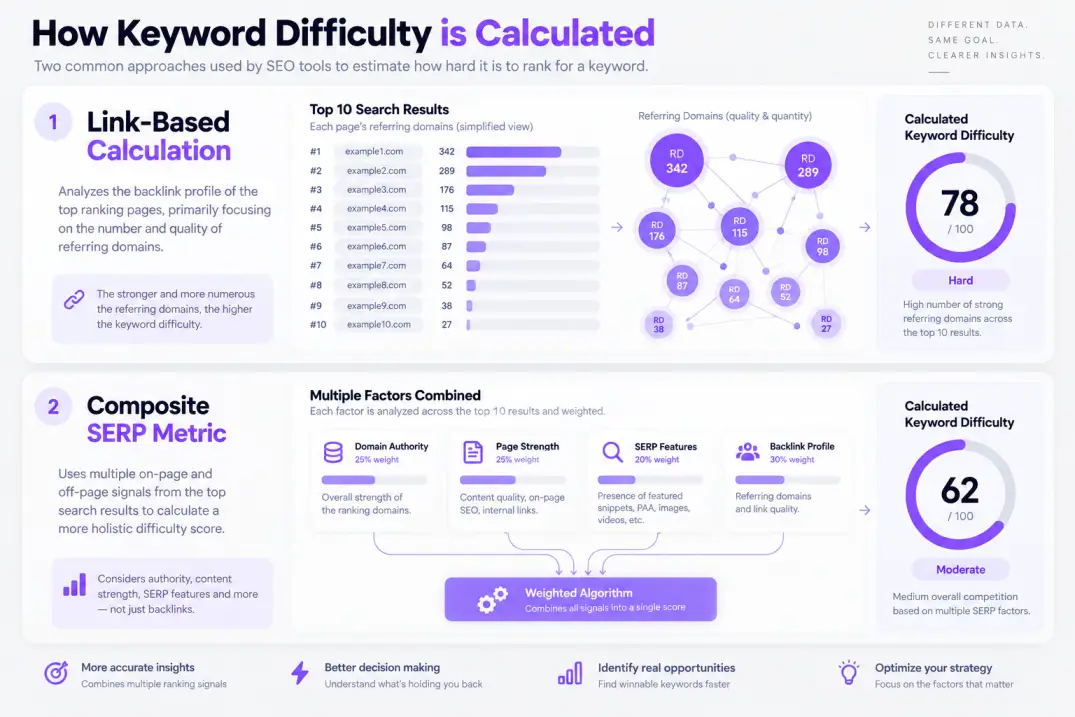
When evaluating complete tool suites, keyword research cannot be viewed in total isolation from technical SEO and authority building.
Mangools handles backlink analysis through a companion tool called LinkMiner. LinkMiner pulls its link data primarily from the Majestic index. It shows referring domains, anchor text distribution, Citation Flow, and Trust Flow. It also includes an embedded website preview that highlights the exact location of a backlink on the referring web page.
However, LinkMiner's index refreshes slower than modern active crawlers, and it lacks live link monitoring alerts. It is perfectly adequate for auditing a dozen backlinks on a competitor's top article, but inadequate for running a large-scale broken link building campaign or toxic backlink audit.
Ahrefs runs an in-house web crawler called AhrefsBot, which third-party telemetry consistently identifies as one of the most active commercial crawlers on the global web, second only to Googlebot. Its backlink database contains over 35 trillion live links, updating continuously throughout the day.
Furthermore, Ahrefs includes a cloud-based Site Audit tool that crawls your entire domain, flagging broken redirects, orphaned pages, duplicate title tags, and Core Web Vitals issues in accordance with Google search central documentation. Mangools has no native technical site audit tool whatsoever.
If technical site health and continuous crawling are core requirements for your team, Ahrefs provides a comprehensive diagnostic suite that KWFinder cannot match.
Rank Tracking and Local SERP Analysis
Monitoring your positions after publishing content is essential for validating your keyword strategy and detecting search intent drift.
Mangools provides SERPWatcher, an exceptionally clean rank tracker designed around a proprietary metric called the "Performance Index." Rather than forcing you to analyze individual keyword position shifts line by line, the Performance Index calculates an aggregate visibility score for your entire tracking list based on position weights and search volumes.
KWFinder also provides an unmatched advantage for hyper-local search marketing. While most enterprise tools restrict local rank tracking to countries or broad metropolitan areas, KWFinder lets you drill down to specific cities, counties, and postal codes across tens of thousands of global regions.
If you run local SEO campaigns for dentists, plumbers, or regional service providers, KWFinder's pinpoint SERP localized results provide unmatched local accuracy.
Ahrefs' Rank Tracker is built for enterprise portfolio monitoring. It allows users to group tracked keywords by tags, track mobile versus desktop visibility across every country, and monitor SERP feature ownership—including Featured Snippets, People Also Ask boxes, Video Carousels, and Knowledge Panels.
This depth allows marketing directors to systematically measure topical authority when building a topical map across competitive verticals.
Pricing Plans & The Real Cost of Ownership
From a financial perspective, the ahrefs vs kwfinder pricing debate hinges less on the base monthly fee and more on how credit limits penalize casual exploration.
Mangools prices its entire five-tool suite—KWFinder, SERPChecker, SERPWatcher, LinkMiner, and SiteProfiler—at an accessible price point with predictable daily allowances.
- Mangools Basic: 49 on monthly billing). Includes 100 keyword lookups and SERP checks per 24 hours, 200 tracked keywords, and 100,000 monthly backlink rows.
- Mangools Premium: 69 on monthly billing). Increases limits to 500 lookups per 24 hours, 700 tracked keywords, 500,000 backlink rows, and 3 simultaneous user logins.
- Mangools Agency: 129 on monthly billing). Provides 1,200 daily lookups, 1,500 tracked keywords, 1.2 million backlink rows, and 10 simultaneous user logins.
Critically, Mangools' query limits reset every 24 hours. If you run 90 searches on Tuesday, you wake up with 100 fresh searches on Wednesday.
Ahrefs operates on a monthly usage credit consumption model that requires careful monitoring.
- Ahrefs Starter: $29 per month (monthly billing only). Offers access to basic keyword metrics and site auditing for solo beginners, but with limited historical depth and tight export restrictions.
- Ahrefs Lite: 108 per month billed annually). Includes 1 user seat and 500 to 1,000 monthly usage credits.
- Ahrefs Standard: 208 per month billed annually). Unlocks the Content Gap tool, 6 months of historical data, and expanded credit limits.
- Ahrefs Advanced: 374 per month billed annually). Includes 2 years of historical data, Webmaster integrations, and team workflows.
- Ahrefs Enterprise: Starts at $1,499 per month for large agencies requiring API access, custom integrations, and dedicated account support.
In Ahrefs, clicking a report, filtering a list of keywords, or viewing a competitor's top pages consumes a usage credit. If an unmonitored team member applies multiple filters across large datasets, your account can consume hundreds of credits in an afternoon, forcing an early tier upgrade or add-on purchase.
| Plan Tier | Mangools (KWFinder) Cost | Ahrefs Equivalent Tier Cost | Primary Usage Limit Model |
|---|---|---|---|
| Entry Level | Basic: $29.90/mo (Annual) | Starter: $29/mo (Monthly only) | Mangools: 100 queries/day; Ahrefs: Minimal rows, restricted tools |
| Core Professional | Premium: $44.90/mo (Annual) | Lite: 108/mo Annual) | Mangools: 500 queries/day; Ahrefs: 500–1,000 credits/mo per seat |
| Agency / Growth | Agency: $89.90/mo (Annual) | Standard: 208/mo Annual) | Mangools: 1,200 queries/day, 10 seats; Ahrefs: Advanced features, 1 seat |
| Enterprise Scale | N/A (Custom via Sales) | Advanced: 1,499/mo | Ahrefs: Multi-year history, heavy API, dedicated limits |
Honest Pros and Cons: What Each Tool Does Best and Worst
No SEO software is flawless. Understanding the functional compromises of each platform protects you from buyer's remorse.
KWFinder Strengths (The Good)
- Zero Learning Curve: The user interface is immediately understandable. A non-technical writer or client can start extracting actionable keyword ideas within three minutes of logging in.
- Realistic Difficulty Scores: The composite KD formula factors in domain-level metrics, preventing beginners from targeting queries monopolized by mega-brands.
- Exceptional Price-to-Value Ratio: At under $45 per month on annual plans, you receive a complete suite that covers keyword research, SERP analysis, backlink checks, and rank tracking.
- Pinpoint Local Search: Unrivaled geographical targeting down to cities and zip codes.
- Daily Allowance Resets: Daily limits mean a heavy research day never leaves you locked out of your account for the remaining three weeks of the billing cycle.
KWFinder Limitations (The Bad)
- Smaller Keyword Index: Lacks coverage for micro-niche B2B queries, regional terms in smaller languages, and platforms outside of Google.
- No Technical Site Auditor: You cannot crawl your domain to locate broken links, indexing errors, or duplicate metadata.
- Shallow Competitor Intelligence: The domain lookup displays only a small snapshot of competitor keywords rather than an exhaustive multi-domain gap analysis.
- Basic Backlink Capabilities: LinkMiner relies on third-party Majestic indexes rather than a dedicated real-time crawler.
Ahrefs Strengths (The Good)
- Industry-Leading Backlink Index: Unmatched accuracy, recency, and depth for competitive link analysis and outreach prospecting.
- Clickstream-Powered Keyword Metrics: "Clicks Per Search" and "Traffic Potential" protect teams from writing articles for zero-click queries.
- Comprehensive Feature Set: Site Explorer, Content Explorer, Site Audit, and Keywords Explorer handle every facet of search marketing under one roof.
- Multi-Search Engine Coverage: Critical for teams tracking visibility across YouTube, Amazon, and international engines.
- Advanced Content Gap Analysis: The fastest method to map out complete topic clusters against multiple industry competitors.
Ahrefs Limitations (The Bad)
- Prohibitive Entry Cost: Starting at $129 per month for a single seat with restricted features, it is expensive for solo operators and bootstrapped founders.
- Strict Usage Credit Throttling: Every filtered report consumes monthly credits, making casual data exploration financially stressful.
- Expensive Additional Seats: Adding extra team members costs between 100 per user per month, making team collaboration costly.
- KD Metric Blind Spots: Difficulty scores based solely on referring domains can severely underestimate the difficulty of ranking against high-authority websites.
Which Tool Wins for Your Specific Use Case?
Ultimately, the choice between kwfinder vs ahrefs comes down to your operational stage and whether your bottleneck is discovering easy search terms or managing complex site-wide technical health.
Choose KWFinder If:
- You are a solo blogger, niche site builder, or affiliate marketer: If your primary job is publishing informational articles that attract organic traffic on a lean budget, KWFinder gives you 90% of what you need at 20% of the cost.
- You provide local SEO services for regional businesses: KWFinder's city-level and county-level search targeting makes it far more agile for localized service businesses than global enterprise platforms.
- You manage freelance copywriters: KWFinder's clean UI means you can give junior writers access to research topics without training them on complex SEO dashboards.
Choose Ahrefs If:
- You run an established digital agency or consultancy: The depth of Site Explorer, white-label client audits, and historical ranking trends are necessary for client reporting and high-ticket strategy.
- Your growth depends heavily on link building and PR outreach: Ahrefs' backlink index is irreplaceable for finding unlinked brand mentions, inspecting competitor link sources, and prospecting outreach partners.
- You manage a large website with complex technical architecture: Ahrefs' automated cloud Site Audit will detect canonical conflicts, broken redirects, and crawl budget waste before they damage your revenue.
Bridging Discovery and Publishing: The Modern Workflow
Many solo builders find that jumping back and forth between manual keyword spreadsheets and content management systems drains valuable momentum. For example, platforms like Qoreta connect this entire sequence into an automated pipeline, identifying low-competition search queries, drafting structured articles, and publishing directly to the site. This approach eliminates the manual friction of exporting CSV files between disparate tools.
If you prefer manual research, the most effective hybrid approach is starting with a focused seed list in KWFinder, verifying search intent manually on Google, and expanding cluster depth using targeted secondary queries.
- KWFinder is ideal for lean teams needing fast, affordable long-tail keyword research without feature bloat.
- Ahrefs is necessary when your strategy requires deep competitor backlink audits, site crawling, and multi-domain gap analysis.
- Pay attention to credit usage: Ahrefs meters every report and filter change, while Mangools offers daily query allowances.
- Never choose your tool solely based on database size; prioritize search intent alignment and actual publishing velocity.
Focus on tools that match your current execution capacity. Having the world's largest backlink database will not move your organic revenue if your publishing pipeline cannot consistently ship high-quality, intent-matched content.
Artificial Intelligence
Intelligence without limits.
We believe great content deserves honest authorship—even when it's AI.
Frequently Asked Questions
KWFinder is significantly easier for beginners. Its interface is clean, displays all core metrics on a single screen, and avoids complex terminology. Ahrefs has a steeper learning curve due to its extensive feature set, credit system, and multi-layered reports.
Mangools bundles all five of its tools—KWFinder, SERPChecker, SERPWatcher, LinkMiner, and SiteProfiler—into every subscription plan. You cannot purchase KWFinder as a standalone product, but the bundled price remains substantially lower than most standalone enterprise keyword tools.
Ahrefs discontinued its famous $7 seven-day trial several years ago. However, it provides Ahrefs Webmaster Tools (AWT) for free, which gives verified website owners limited access to Site Explorer and Site Audit for their own domains.
Both platforms update search volume metrics on a monthly schedule, aligning with updates from Google Keyword Planner and clickstream data providers. However, both tools allow you to refresh live SERP results on demand to see the current top-ranking pages.
Ahrefs calculates keyword difficulty solely based on the number of referring domains pointing to the top 10 ranking pages. KWFinder uses a composite calculation that incorporates domain authority, page strength, and link profile metrics, often resulting in higher difficulty scores when high-authority websites rank on page one.
Yes. KWFinder excels at local search research, allowing you to select specific cities, states, and counties across global markets. This makes it particularly powerful for local service providers, regional agencies, and brick-and-mortar stores.
Yes. Ahrefs Keywords Explorer supports ten different search engines, including YouTube, Amazon, Bing, Yahoo, Yandex, Baidu, and Naver. KWFinder focuses exclusively on Google search data.
When you exhaust your monthly usage credits in Ahrefs, you cannot run new report filters, open detailed keyword lists, or inspect backlink tables until your billing cycle resets, unless you purchase additional credit packs or upgrade to a higher tier.
Yes. Both KWFinder and Ahrefs support exporting keyword data and SERP metrics into CSV format or copying them directly to your clipboard for use in Google Sheets, Excel, or internal project management systems.