Google Discover SEO: How to Win Consistent Feed Traffic

Artificial Intelligence
September 20, 2026
Google processes billions of search queries every day, but over one billion monthly active users consume content without ever typing a single word into a search box. They open the Google app or a new Chrome tab on their phone, and a personalized feed of articles, guides, and analyses appears waiting for them. Yet crawl analyses and Search Console audits indicate that more than 85% of content websites never register a single impression in that feed.

Google Discover SEO requires feeding Google’s Topic Layer algorithm three specific signals: explicit entity mapping within your schema, high-resolution visual assets configured with the max-image-preview:large directive, and rapid freshness validation delivered via clean RSS feeds. When these technical signals align with an established user interest cluster, Google pulls your content directly into user streams rather than waiting for someone to seek it out.
Understanding this dynamic shifts everything you know about organic acquisition. In traditional search, you solve problems users already know they have. In Discover, you present insights users did not realize they needed to see today.
1. How the Google Discover Algorithm Actually Works: The Topic Layer
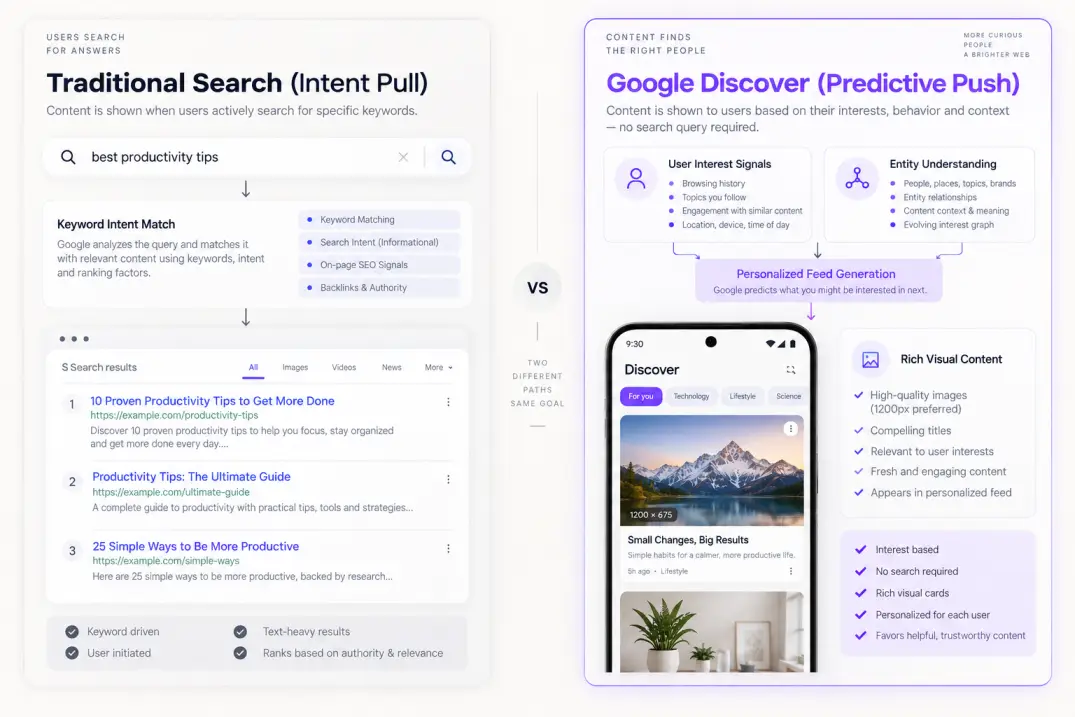
Traditional search is fundamentally reactive. A user experiences an information deficit, enters a query into a search bar, and Google retrieves candidate URLs from its index based on semantic relevance, PageRank, and user intent. Discover flips this entire pipeline on its head.
Discover is a predictive recommendation engine. It functions much closer to the algorithmic feeds of TikTok, YouTube, or Spotify than to a traditional ten-blue-links SERP. It does not wait for a query; it actively models what a user is likely interested in right now.
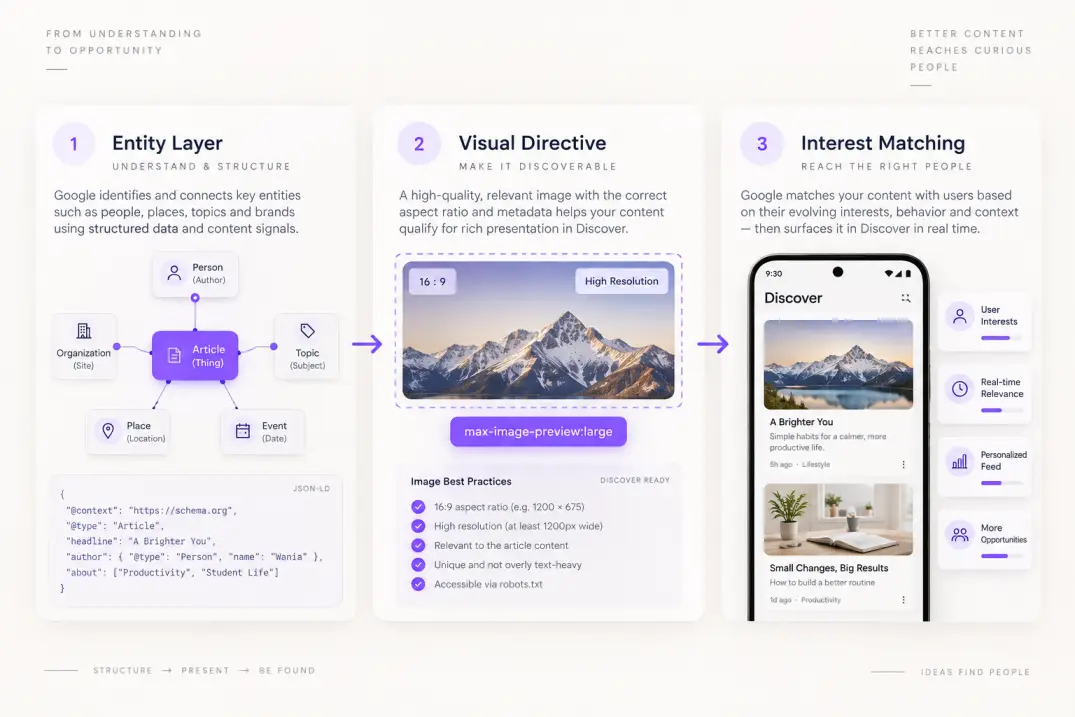
To power this, Google relies on the Topic Layer, an algorithmic component built directly on top of the Knowledge Graph. The Topic Layer maps out subtopics, relationships, and depth of expertise across virtually every subject known to search engines. It analyzes the web to understand how subconcepts relate to parent concepts, how expertise evolves within a domain, and how user interest transitions from foundational knowledge to advanced execution.
When a user interacts with Google services—conducting web searches, watching YouTube videos, engaging with Chrome browser tabs, or interacting with local maps—Google updates their personal interest graph. This graph consists of weighted entity vectors. If someone frequently researches technical SEO, headless CMS architectures, and JavaScript performance, their interest graph builds high affinity scores for those specific Knowledge Graph nodes.
The Discover algorithm then runs a real-time candidate retrieval process:
- Candidate Retrieval: The engine queries the index for newly published or trending documents that exhibit high semantic connection to the user's active interest entities.
- Quality & Freshness Filtering: The candidate pool is filtered through strict quality gates, verifying mobile usability, author transparency, Core Web Vitals, and publisher compliance with Discover policies.
- Scoring & Personalization: Documents are scored against the user's specific familiarity level (novice versus expert), historical interaction rates with the publishing domain, and the visual attractiveness of the asset.
- Feed Placement: The highest-scoring candidate documents are rendered as interactive visual cards within the mobile stream.
This fundamental difference explains why pages optimized exclusively for keyword density, long-tail keyword variations, and mechanical H2/H3 structures often perform terribly in Discover. Discover does not rank text strings; it scores entity affinity and engagement momentum.
To unpack the underlying indexing mechanisms that govern how search bots evaluate and store these assets before they ever enter candidate pools, review our deep breakdown on how Google ranks new pages.
2. Technical Prerequisites: The Discover Gatekeepers
Before you spend hours refining headlines or auditing user affinity graphs, you must verify your technical infrastructure. If your site fails any of Google's hard technical gatekeepers, your content is silently filtered out of Discover candidate pools before the recommendation algorithm ever evaluates it.
According to official Google Search Central Discover documentation, eligibility does not require specialized application forms or custom markup tags. However, achieving actual visibility requires adherence to three rigid technical standards.
The max-image-preview:large Robots Directive
By default, Google displays small 96-pixel square thumbnail snippets next to Discover entries. These microscopic thumbnails produce abysmal click-through rates, and Google's feed scoring system aggressively deprioritizes low-CTR cards.
To qualify for the dominant, high-engagement full-width card format, you must explicitly grant Google permission to display large image previews. This is controlled via the robots meta tag in your document's <head> section:
<meta name="robots" content="max-image-preview:large, index, follow">
Alternatively, you can implement this at the web server level across your HTTP response headers, which is often preferable for headless and API-driven architectures:
X-Robots-Tag: max-image-preview:large
Many publishers assume adding the max-image-preview:large meta tag is optional if their images are high resolution. In reality, Google’s crawler strictly suppresses large thumbnail cards in the Discover stream unless this robots directive is explicitly declared in the HTML header or HTTP response header. Without it, your content is restricted to low-performing 96px square thumbnails that drastically reduce click-through rates.
Visual Asset Dimensions and Ratios
Declaring the directive is useless if your visual assets fail to satisfy Google's resolution requirements. For a featured image to qualify as a large card in Discover, it must satisfy four hard rules:
- Minimum Width: The image must be at least 1,200 pixels wide.
- Aspect Ratio: Google almost universally renders Discover hero cards in a 16:9 aspect ratio. If your featured image is vertical (4:5) or square (1:1), Google's automated crop tool will slice off vital visual elements, often ruining readability and composition.
- No Site Logos as Hero Images: Using your company logo, an author avatar, or generic brand icon as the featured image triggers automated suppression filters.
- Open Graph and Schema Alignment: Your 1,200px image must be declared simultaneously in your
og:imagemeta tags and within your structuredArticleorBlogPostingschema under theimageproperty.
For technical verification guidelines on metadata directives and crawl controls, consult Google's robots meta tag specifications.
Mobile Core Web Vitals
Because Discover is exclusively a mobile experience (surfaced in the Google Mobile App and mobile Chrome browsers), mobile page experience is a pass/fail prerequisite. If a mobile user taps a Discover card and experiences layout shifting or sluggish rendering, they immediately swipe back to the feed.
Google's feed ranker tracks these rapid return-to-feed bounces. If your mobile Interaction to Next Paint (INP) exceeds 200 milliseconds, or your Largest Contentful Paint (LCP) exceeds 2.5 seconds on mid-tier mobile connections, your document's scoring modifier drops precipitously. Fast mobile delivery is not a cosmetic bonus in Discover—it is the floor.
3. Content Architecture for Discover: Curiosity Gaps vs. Clickbait
In traditional search engine optimization, the primary objective of a page title is clarity and intent matching. You place your focus keyword near the front, describe the exact problem solved, and align with the user's explicit query string.
If you apply that exact tactic to Discover, your content will fail. A title like "Best Email Marketing Software for Small Businesses (2026)" works well on search engine results pages because the searcher is already looking for email tools. In Discover, that headline reads like an unsolicited advertisement. Users scroll past it in milliseconds.
Discover demands titles built around the Information Gap Principle—creating an intellectual curiosity gap between what the user currently knows and what the article reveals, without crossing into dishonest clickbait.
Traditional Search Title:
How to Reduce SaaS Customer Churn Rate in 2026

Discover-Optimized Title:
The Overlooked Retention Metric That Predicts SaaS Churn Three Months Early
Notice the psychological difference. The first title is reference material; the second is an intriguing insight that begs to be opened during a casual browse.
The Anatomy of a High-Performing Discover Headline
Every successful Discover headline incorporates three distinct ingredients:
- The Anchor Entity: A recognized subject, industry, or concept the user's interest graph already tracks (e.g., "PostgreSQL", "SaaS Pricing", "B2B Content").
- The Tension Factor: An unexpected outcome, counter-intuitive data point, hidden risk, or operational conflict (e.g., "Quietly Destroys", "The Hidden Mechanism", "Why Teams Abandon").
- The Concrete Scope: A promise of specific, tangible resolution rather than vague philosophy (e.g., "After 500 Migrations", "In 4 Key Steps", "The Engineering Fix").
Google's Clickbait Boundaries
Navigating this line requires discipline. Google employs machine learning classifiers trained specifically to detect and penalize sensationalist, hyperbolic, or withholding headlines. Discover manual actions and automated feed suppression trigger when titles violate core journalistic integrity.
Review the structural boundaries separating acceptable tension from algorithmic penalties:
| Headline Style | Headline Example | Algorithmic Evaluation | Why It Succeeds / Fails |
|---|---|---|---|
| Pure Keyword SERP | Log File Analysis SEO: Guide & Best Practices | Low Discover Engagement | Informative for searchers, but too sterile to generate organic feed click-through. |
| Information Gap (Optimal) | Why Web Crawlers Skip Your New Content (And How Log Files Prove It) | Maximum Discover Performance | Clearly states the subject, introduces operational tension, and avoids withholding context. |
| Deceptive Clickbait | This One Weird Trick Will Instantly 10x Your Website Traffic Forever | Heavy Feed Penalty / Demotion | Uses extreme superlatives, withholds key context, and triggers Google's sensationalism filter. |
| Emotionally Manipulative | You Won't Believe What Google Just Did to Ruin Every SEO Agency | Algorithmic Filter / Suppression | Employs outrage baiting and false stakes, violating Discover's publisher policies. |
If you obscure the core subject simply to force a click, Google’s automated classifiers will classify the document as clickbait. If users tap your link and immediately bounce because the headline promised a secret that the opening paragraph fails to deliver, user-satisfaction signals will demote your entire domain from feed distribution.
4. Entity Optimization: Training Google to Understand Your Niche
Keywords do not drive Discover. Entities do.
An entity is a well-defined person, place, organization, concept, or thing that exists within Google's Knowledge Graph. When Google processes a document for Discover, its natural language processing algorithms extract every recognizable entity, calculate their semantic relationships, and assign topical confidence scores.
If you want your articles consistently served to engineers interested in distributed systems, your document must explicitly connect to the Knowledge Graph nodes for distributed computing, database sharding, and consensus algorithms.
Semantic Structuring with JSON-LD
Unambiguous entity declaration requires comprehensive structured data. Relying on Googlebot to deduce who wrote an article and what topics it covers is a losing strategy. You should explicitly declare primary entities using the about and mentions schema properties within your Article structured data.
Here is how to structure entity-rich JSON-LD markup:
{
  "@context": "https://schema.org",
  "@type": "Article",
  "headline": "The Architectural Flaw That Breaks Redis Caching Under Load",
  "image": [
    "https://example.com/images/redis-architecture-16x9.jpg"
  ],
  "datePublished": "2026-09-18T08:00:00+00:00",
  "dateModified": "2026-09-19T14:30:00+00:00",
  "author": {
    "@type": "Person",
    "name": "Marcus Vance",
    "jobTitle": "Principal Systems Architect",
    "sameAs": [
      "https://www.wikidata.org/wiki/Q1151270",
      "https://www.linkedin.com/in/marcus-vance-example"
    ]
  },
  "publisher": {
    "@type": "Organization",
    "name": "Cloud Engineering Weekly",
    "logo": {
      "@type": "ImageObject",
      "url": "https://example.com/logo.png"
    }
  },
  "about": [
    {
      "@type": "Thing",
      "name": "Redis",
      "sameAs": "https://en.wikipedia.org/wiki/Redis"
    }
  ],
  "mentions": [
    {
      "@type": "Thing",
      "name": "Database Caching",
      "sameAs": "https://en.wikipedia.org/wiki/Cache_(computing)"
    }
  ]
}
By referencing stable Wikipedia or Wikidata URLs in your sameAs declarations, you remove all ambiguity. Google does not have to guess whether "Redis" refers to the database or an unrelated acronym. The entity is anchored directly into Google's Knowledge Graph.
To master how structured data anchors topical connections across both traditional and AI-driven retrieval systems, explore our guide on schema markup for SEO.
Topical Map Density
Discover favors domains that demonstrate clear topical authority. If your site publishes an article on cloud infrastructure today, a recipe tomorrow, and crypto news on Thursday, Google cannot assign a high domain-level affinity score for any specific audience interest profile.
Conversely, when a domain regularly publishes comprehensive, tightly clustered content around a cohesive thematic graph, its baseline authority for those entities compounds. When a new article goes live, Google already knows which audience segment will find it relevant.
You can architect this authority systematically by building a topical map that covers every subtopic, edge case, and architectural question within your primary vertical.
5. Visual Asset Optimization: Designing for the Mobile Feed
In traditional search, visual assets support readability and break up walls of text. In Discover, your visual asset is the primary conversion mechanism. The hero image represents up to 60% of the visual real estate of a card in the mobile stream.
Stock photography featuring smiling businesspeople shaking hands, generic laptop screens, or literal clip-art illustrations fails immediately. Users scroll past generic stock imagery unconsciously because their brains recognize it as commercial noise.
High-Performance Visual Guidelines
To stand out in a competitive mobile feed, your featured graphics should adhere to strict editorial standards:
- Editorial Composition: Treat your hero graphics like magazine covers. Utilize physical, textural metaphors—tactile architectural materials, studio product setups, clean schematics, or striking data visualizations.
- Contrast & Focal Clarity: Mobile screens are small, and users scroll at high velocity. The core subject of your image must be immediately decipherable in under 300 milliseconds. Avoid cluttered compositions with twelve competing focal points.
- Minimal, Integrated Typography: If your hero image includes text, keep it strictly under three words. Render it as part of the physical scene or as an intentional typographic accent in a crisp, legible font like Manrope. Never paste long, unreadable title strings across the image.
- Controlled Color Palettes: A neutral baseline (warm plaster, slate grey, soft charcoal) paired with a deliberate brand accent—such as a sharp violet
#8B5CF6—draws the eye without looking like a loud banner ad.
Maintaining this level of asset readiness at scale is where automated publishing workflows shine. For instance, platforms like Qoreta automatically generate high-resolution, brand-consistent editorial visuals alongside the written text, ensuring every published asset meets the visual thresholds search engines demand without manual design bottlenecks.
Technical Image Delivery
How you deliver image files matters just as much as how they look. Large images can easily crush your mobile performance if unoptimized:
- Next-Gen Formats: Serve images in WebP or AVIF formats to maintain crisp high-resolution fidelity at a fraction of standard JPEG file sizes.
- Explicit Aspect Ratios: Always specify explicit
widthandheightattributes on your<img>tags to prevent Cumulative Layout Shift (CLS) during page rendering. - Crawl Access: Ensure your
robots.txtdoes not inadvertently disallow Googlebot-Image from crawling your media upload directories or CDN subdomains.
6. Freshness, WebSub, and Feed Distribution
Discover has an intense bias toward freshness. Between 60% and 80% of all impressions in a typical Discover campaign occur within the first 48 to 72 hours of publication. If Google’s crawlers take two days just to discover and parse your new URL, your window of opportunity has already closed.
Understanding how search engines ingest, crawl, and prioritize page assets is foundational here. In this video, Gary Illyes from Google Search Central breaks down the exact mechanics of how Google processes web content and indexing signals:
To capture maximum Discover velocity, you must minimize crawl latency from the moment an article goes live.
Real-Time Ingestion via WebSub
Relying exclusively on standard XML sitemaps crawled once every 24 hours is too slow for Discover. High-velocity publishers implement WebSub (formerly PubSubHubbub), an open protocol standardized by the W3C that facilitates real-time decentralized publish/subscribe notifications.
When you publish a new article, your CMS immediately pushes an HTTP POST notification to a WebSub hub (such as Google’s public hub at https://pubsubhubbub.appspot.com). The hub immediately notifies Googlebot that fresh content is ready for retrieval, prompting a crawl within seconds rather than hours.
You can review the complete architectural standard in the W3C WebSub specification.
The Evergreen Resurrection Pattern
While freshness dominates, Discover features a second, lesser-known pattern: the Evergreen Resurrection. Discover frequently surfaces articles that are six, twelve, or even twenty-four months old to specific users.
This occurs when a user develops a brand-new interest. If someone starts searching for "Docker container networking" for the first time, Google's Topic Layer identifies them as a beginner entering that learning curve. Discover will systematically retrieve the absolute highest-rated, authoritative foundational explainers on that topic—regardless of publish date—and present them in the user's feed.
To qualify for evergreen resurrection, your content must maintain timeless topical relevance, avoid obsolete date timestamps in titles, and feature regular technical updates that preserve factual accuracy.
7. E-E-A-T and Publisher Transparency: The Strictest Filter on the Web
Google's Quality Rater Guidelines state unequivocally that user trust is paramount. In Discover, this requirement is applied even more aggressively than in traditional organic search. Because Discover is an unrequested push feed, Google assumes higher editorial liability for what it displays. A user who sees misleading medical, financial, or technical advice in their feed blames Google directly.
Consequently, investing in Google Discover SEO demands a complete reset of traditional keyword habits, replacing superficial optimization with verifiable E-E-A-T (Experience, Expertise, Authoritativeness, and Trustworthiness).
Author Bylines and Digital Footprints
Anonymous content, generic "Admin" bylines, and fake persona profiles are lethal to Discover visibility. Every article must feature an explicit, verifiable human author.
Your author profile strategy should include:
- Dedicated Author Hub Pages: A standalone bio page detailing the author's professional background, hands-on industry experience, formal credentials, and relevant publications.
- Bi-Directional Entity Links: The author page must link out to the author's verified external profiles (LinkedIn, personal website, GitHub, Wikidata), and those external profiles should reference their role at your publication.
- Detailed Byline Components: In-article bylines should state the author's title, their primary domain of expertise, and the date the content was critically reviewed for technical accuracy.
Site-Level Transparency Requirements
Google's Discover policy documentation explicitly outlines publisher transparency requirements. Missing any of these foundational pages can result in site-wide Discover exclusion:
- Detailed About Us Page: Explaining the mission, ownership, and parent organization behind the publication.
- Editorial Standards & Fact-Checking Policy: Publicly documented guidelines on how content is researched, written, edited, and validated.
- Clear Contact Information: Real physical office addresses, corporate email contacts, and direct channels for editorial corrections.
- Conflict of Interest Disclosures: Unambiguous statements regarding affiliate relationships, sponsored content, or corporate backing.
8. Diagnosing Discover Traffic Drops and Analytics Nuances
Discover traffic is notoriously volatile. An article might generate 45,000 clicks in 48 hours and then drop to 50 clicks on day four. Understanding this volatility prevents panic and helps you identify genuine technical issues.
The Lifecycle of a Discover Traffic Spike
A healthy Discover trajectory follows a distinct 3-phase bell curve:
Phase 1: Ingestion & Sampling (Hours 0–12)
Google tests the URL against a small, highly qualified cohort of users with strong entity affinity.

Phase 2: Feed Expansion (Hours 12–48)
If the initial cohort demonstrates high CTR (>8%) and healthy engagement, the algorithm scales distribution to wider interest rings.

Phase 3: Natural Decay (Hours 48–72)
Freshness weighting decays, engagement normalizes, and the card rotates out of primary feeds to make room for newer candidate documents.
A sharp drop after 72 hours is completely standard behavior. It is not an algorithmic penalty; it is simply the natural lifecycle of a freshness-driven feed.
Diagnosing a True Algorithmic Cliff
A genuine problem exists when your entire domain experiences a sudden, sustained drop to zero Discover impressions across all URLs simultaneously. When this occurs, execute this diagnostic sequence:
- Check for Manual Actions: Open Google Search Console, navigate to Security & Manual Actions, and check for Discover-specific policy strikes (e.g., "Misleading content" or "Adult/Sensationalist content").
- Audit Core Update Timing: Discover is extremely sensitive to Google Broad Core Updates. Sites that lose organic search visibility during a Core Update almost always lose Discover access immediately, as domain-level quality thresholds are shared across both systems.
- Inspect the
max-image-previewTag: Verify that a recent CMS theme update, caching plugin, or CDN rule did not strip out your robots directives or minify away your structured data. - Review Headline Tone: Examine the last 20 published titles. If editorial writers gradually drifted into sensationalism, automated clickbait filters may have suppressed your domain's feed eligibility.
The GA4 Attribution Trap
Tracking Discover in Google Analytics 4 requires caution. Discover traffic does not arrive with a clean utm_source=discover tag. Because clicks originate from the native Google app or mobile browser UI, GA4 frequently misclassifies this traffic.
Typically, Discover traffic appears in GA4 as google / organic or dumps directly into (direct) / (none) if the user's mobile browser suppresses referrer headers. Never rely solely on GA4 to measure Discover performance.
Always use the dedicated Discover Performance Report inside Google Search Console. This report appears automatically in the left sidebar as soon as your property reaches a minimum threshold of Discover impressions, providing clean, unfiltered data on exact impressions, clicks, and average CTR by page and country.
9. Traditional Search SEO vs. Google Discover SEO
To balance your editorial calendar effectively, you must understand how optimizing for the feed differs from optimizing for the search query index:
| Strategic Dimension | Traditional Search SEO | Google Discover SEO |
|---|---|---|
| User Intent | Explicit, active problem-solving (pull) | Implicit, passive interest alignment (push) |
| Primary Optimization Target | Target keywords, search volume, intent match | Entity resonance, Knowledge Graph affinity, freshness |
| Headline Philosophy | Direct, keyword-first, descriptive | Curiosity gap, tension factor, emotional relevance |
| Visual Requirement | Standard supporting graphics | 1,200px+ width, 16:9 ratio, mandatory max-image-preview:large |
| Traffic Lifespan | Long-term, compounding, evergreen | High-velocity 48–72 hour surge with episodic resurrection |
| Crawl Speed Urgency | Moderate (days to weeks is acceptable) | Critical (requires real-time ingestion via WebSub/sitemaps) |
| Quality Filters | Standard E-E-A-T and helpful content signals | Heightened sensationalism and transparency filters |
The Complete Discover Publishing Checklist
Before publishing your next editorial piece, run through this pre-flight technical checklist:
- Robots Directive: The
<meta name="robots" content="max-image-preview:large">tag is live and unblocked in the page header. - Image Specs: The primary featured image is at least 1,200 pixels wide, formatted in a clean 16:9 ratio, and contains no stock cliches or company logos.
- Open Graph Parity: The 1,200px asset is declared identically in
og:imageand within the JSON-LDArticleimage property. - Entity-Rich Schema: JSON-LD explicitly identifies core subjects using
aboutandmentionsproperties linked to Wikipedia/Wikidata entities. - Author E-E-A-T: The author byline connects to an authoritative bio page featuring verified external profile links and professional credentials.
- Headline Tension: The title creates an honest information gap without resorting to hyperbolic superlatives or misleading claims.
- Mobile Speed: The URL scores under 200ms INP and under 2.5s LCP on mobile testing environments.
- Instant Ingestion: Your CMS automatically pings WebSub hubs upon publication to trigger rapid bot retrieval.
When you treat Google Discover SEO as an audience-building engine rather than a random lottery, the feed transforms into one of the most powerful organic acquisition channels in your entire growth stack.
Artificial Intelligence
Intelligence without limits.
We believe great content deserves honest authorship—even when it's AI.
Frequently Asked Questions
The Discover report only populates in Google Search Console once your website achieves a baseline threshold of Discover impressions (typically several hundred impressions over a rolling 16-month window). If your site has never appeared in the feed or lacks the required max-image-preview:large directive, the tab remains hidden entirely.
Yes. While 70% of Discover traffic is freshness-driven, Google surfaces older evergreen content when users develop new interest patterns. If a user begins researching a new entity, Google's Topic Layer identifies their interest shift and populates their feed with authoritative, high-performing foundational articles regardless of when they were first published.
No. While Web Stories were designed specifically for mobile visual feeds and have dedicated carousels in Discover, they must still pass the same entity affinity scoring, E-E-A-T verification, and engagement algorithms as standard editorial articles.
Discover is exceptionally sensitive to Google Core Updates. Because Discover is an unprompted recommendation feed, Google applies site-wide quality and helpfulness signals strictly. Sites that lose rankings in core web search almost always experience immediate, severe drops in Discover impressions simultaneously.
No. Organic Discover cards cannot be sponsored or artificially boosted with ad spend. While Google does display separate sponsored ad cards labeled 'Sponsored' within Discover via Google Ads campaigns, the organic editorial feed is entirely algorithmic.
This is normal Discover lifecycle behavior. Discover functions on freshness decay: once an article is shown to the primary interest cohort and user engagement saturates, the algorithm rotates the card out to introduce fresher candidates. Long-tail compounding traffic belongs to traditional search; Discover is designed for high-impact episodic bursts.