How to Write Engaging Social Media Captions (101 Examples)

Artificial Intelligence
September 28, 2026
You spend forty minutes on the perfect photo, hit publish, and watch it get scrolled past in about two seconds. The image was fine. The words underneath it were the problem, and most people never fix that because they treat the text as an afterthought.

Here is the short answer on how to write engaging social media captions: open with a hook that earns the next sentence, give the reader one useful or entertaining idea, and close with a single clear action. Keep the first line strong enough to survive on its own, because on most platforms that line is all a stranger sees before deciding to keep reading or move on.
That is the whole skeleton. The rest of this guide fills it in: what a caption really does, a repeatable formula, platform-specific rules, tone, tools, common mistakes, and 101 copy-ready examples you can adapt today.
What Is a Caption, and What Does It Do?
A caption is the text attached to a post: the words that frame an image or video, add context the visual can't carry on its own, and tell the audience what to do next.
So what does a caption do in practice? Four jobs, and great ones handle all four:
- It stops the scroll. The opening line competes with every other post in the feed.
- It adds meaning. A photo shows what happened. The caption explains why anyone should care.
- It signals relevance. Clear wording helps platforms and search engines understand what your post is about.
- It drives an action. Comments, saves, shares, clicks, replies. If you never ask, most people never act.
That is also the honest answer to what is the purpose of caption writing: it turns passive viewing into a relationship. A post without a caption is a billboard. A post with a good one is the start of a conversation.
Why Captions Matter More Than You Think
Three shifts have raised the stakes in the last few years.
Engagement signals shape reach. Instagram's guidance for creators, available on the Instagram Creators hub, consistently points to comments, shares, and saves as signs that content resonates. The caption is the easiest lever you have to earn all three.
Captions are searchable text. Social platforms behave more like search engines every year, and Instagram has said that public posts can appear in search engine results. Descriptive, plain wording gives your post a chance to be found by someone who has never followed you. The same clarity helps AI answer engines understand and reuse your content, a topic we unpack in our guide to generative engine optimization.
Accessibility is part of quality. Captions and alt text make posts usable for people who rely on screen readers. The W3C Web Accessibility Initiative explains how meaningful text alternatives work, and the principle carries over: write for everyone who might meet your post.
How to Write Engaging Social Media Captions: The 5-Part Formula
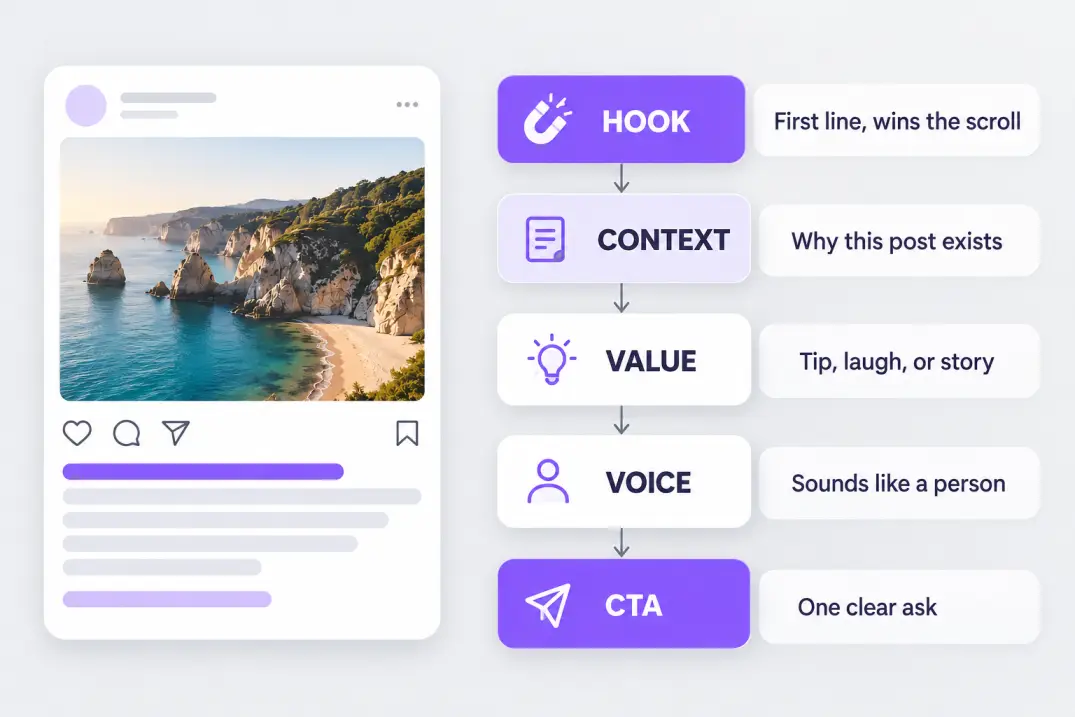
Every caption that performs shares the same bones. Memorize these five parts and you'll never stare at a blank box again: Hook, Context, Value, Voice, and Call to Action.
1. Hook: win the first line
The hook is the only part guaranteed to be read, so it carries the most weight. Six patterns work across almost every niche:
- The question: “When did you last log off for a full day?”
- The bold claim: “Most content calendars fail in week two.”
- The number: “3 edits that doubled my saves.”
- The mini-story: “I almost deleted this post.”
- The mistake: “The error I made for two years.”
- The direct callout: “If your posts get views but no replies, read this.”
A good hook creates a small itch: curiosity, recognition, or mild disagreement. Your job in the rest of the caption is to scratch it.
2. Context: say why this post exists
One or two sentences connect the visual to the point. A photo of a half-finished workbench means nothing until the caption says, “This is week three of building our first product.” Context turns a pretty image into a story with stakes.
3. Value: give the reader something
Every caption should teach, entertain, or move someone. A tip they can use in five minutes. A joke they'll tag a friend in. A story that makes them feel less alone. If a caption offers none of those, it is announcing, not communicating.
4. Voice: sound like a person
Read your draft aloud. If it sounds like a press release, rewrite it. Use contractions, short sentences, and the exact words your customers use in their comments and emails. Personality is not decoration. It is the reason people follow you instead of the fifty other accounts in your niche.
5. Call to action: ask for one thing
A call to action (CTA) tells readers what to do next, and the word to underline is one. “Save this, share it, comment, and click the link” gives people four reasons to do nothing. Pick the action that matches your goal: comments for reach, saves for useful content, shares for relatable content, link clicks for sales.
Pro tip: write your CTA before anything else. When you know the single action you want, the hook and body almost write themselves because every sentence now has a job.
Why Your First Line Does Most of the Work
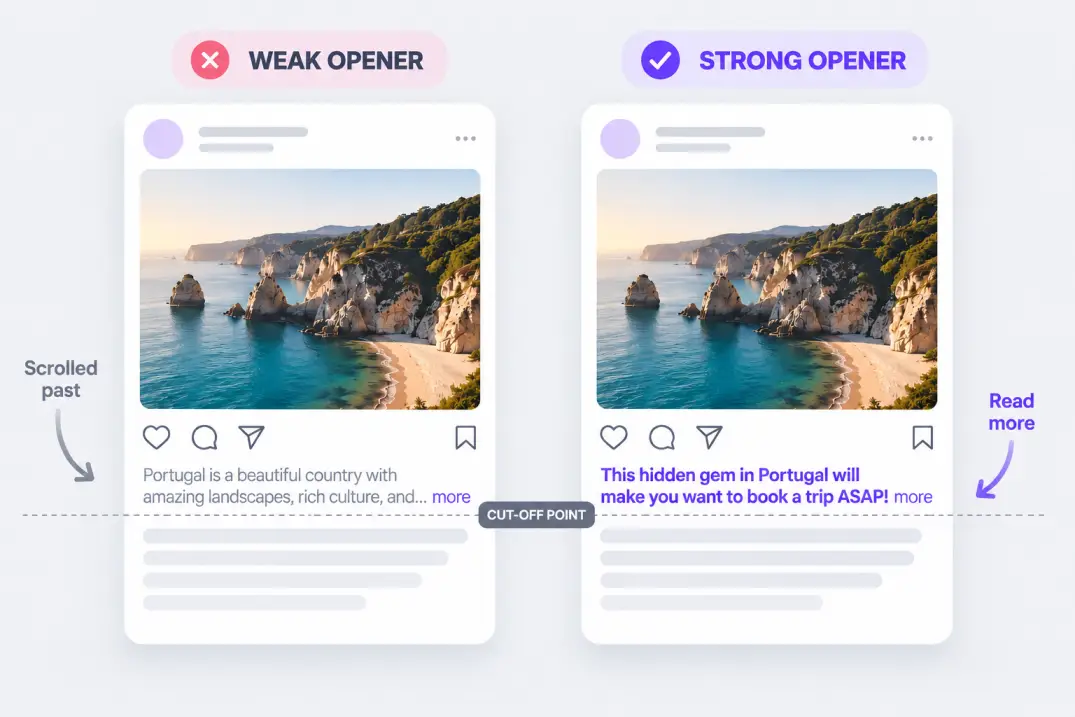
Most feeds show only a short slice of your text before cutting it off with a “more” link. On Instagram that slice is roughly the first line or two, often cited at around 125 characters. On LinkedIn it is a few lines. Everything after that only exists for the people you already convinced.
This leads to a rule worth tattooing on your content calendar: the first line has to work even if nobody clicks “more.”
Compare two openers for the same post about a bakery's new sourdough:
- Weak: “We are so excited to announce that we have some big news to share with all of you today.”
- Strong: “The sourdough took 3 years to get right. Tomorrow it's on the counter.”
The weak version wastes its only visible sentence on throat-clearing. The strong version gives a detail, a tease, and a timeline in fourteen words.
Burying the point. Many captions spend three sentences warming up before saying anything useful, and the reader is gone by sentence two. Lead with the most interesting thing you have, then explain.
If you learn better by watching, the video above from copywriter Alex Cattoni walks through six copywriting tips and live examples for Instagram captions. It pairs well with the formula in this guide.
How Long Should a Caption Be?
There is no magic length. There is only the length your idea needs. A photo of a sunset can carry five words. A lesson learned from a failed launch needs a few hundred. What changes by platform is the ceiling and the amount of text people see before truncation.
| Platform | Approximate limit | What people see first | Best approach |
|---|---|---|---|
| 2,200 characters | The first line or two | Hook first, value in the body, CTA at the end | |
| TikTok | Varies, and has grown over time | The first line or two | Short, keyword-led, pair with an on-screen text hook |
| About 3,000 characters | Roughly the first three lines | Professional insight, short paragraphs, one takeaway | |
| X (Twitter) | 280 characters for standard accounts | The whole post | One idea, sharp wording |
| Very long | The first few lines | Conversational, question-led |
Platform limits change, so confirm the current numbers inside each app before you plan a template around them.
A useful rule of thumb: short captions suit strong visuals and personality-led accounts, while longer captions suit teaching, storytelling, and anything where the reader needs context to care.
Match Your Caption to the Platform
The same idea should not be posted the same way everywhere. Each platform trains its audience to expect a certain register.
- Instagram: warm, visual, personality-forward. Storytelling and saves-worthy tips perform well.
- TikTok: fast, informal, and tightly linked to the video. The on-screen hook does the heavy lifting, so the caption reinforces it with searchable words.
- LinkedIn: professional but human. Lessons, numbers, and honest reflections beat corporate announcements.
- X: compact and opinionated. One sharp idea beats a summary of three.
- Facebook: conversational and community-minded, with questions that invite replies.
A practical shortcut is to write the caption once for your primary platform, then adapt the hook and length for the rest. If you want to stretch each piece further, our guide to content atomization shows how to turn one idea into many platform-native assets.
Find Your Voice and Keep It Consistent
Voice is the personality your words carry: playful, calm, blunt, nerdy, warm. Tone is how that voice flexes in different moments, so you can be playful in a product teaser and gentle in a customer-service reply without sounding like two different brands.
To define your voice quickly, answer three questions:
- If our brand were a person at a dinner party, how would they talk?
- Which three adjectives do our best customers use to describe us?
- What would we never say?
Write the answers in a short note and keep it beside your scheduler. Consistency builds recognition, and recognition builds trust.
Emojis, Line Breaks, and Hashtags
These three small choices change how a caption feels to read.
Line breaks are the cheapest readability upgrade available. A dense block of text looks like homework. Two or three short lines per paragraph look like a conversation.
Emojis work best as visual bullets or as tone signals. One well-placed emoji at the start of a list item helps the eye. A wall of them makes the message hard to parse and can trip screen readers.
Hashtags help platforms categorize your content, but they are seasoning, not the meal. Use a handful of specific, relevant tags rather than a long block of generic ones, and put your important keywords in the sentence itself, where both people and search systems can read them. Check the platform's current guidance on hashtag limits before you build a routine.
A Simple 6-Step Caption Writing Process
When you're figuring out how to caption Instagram posts (or anything else) week after week, a repeatable process beats inspiration every time.
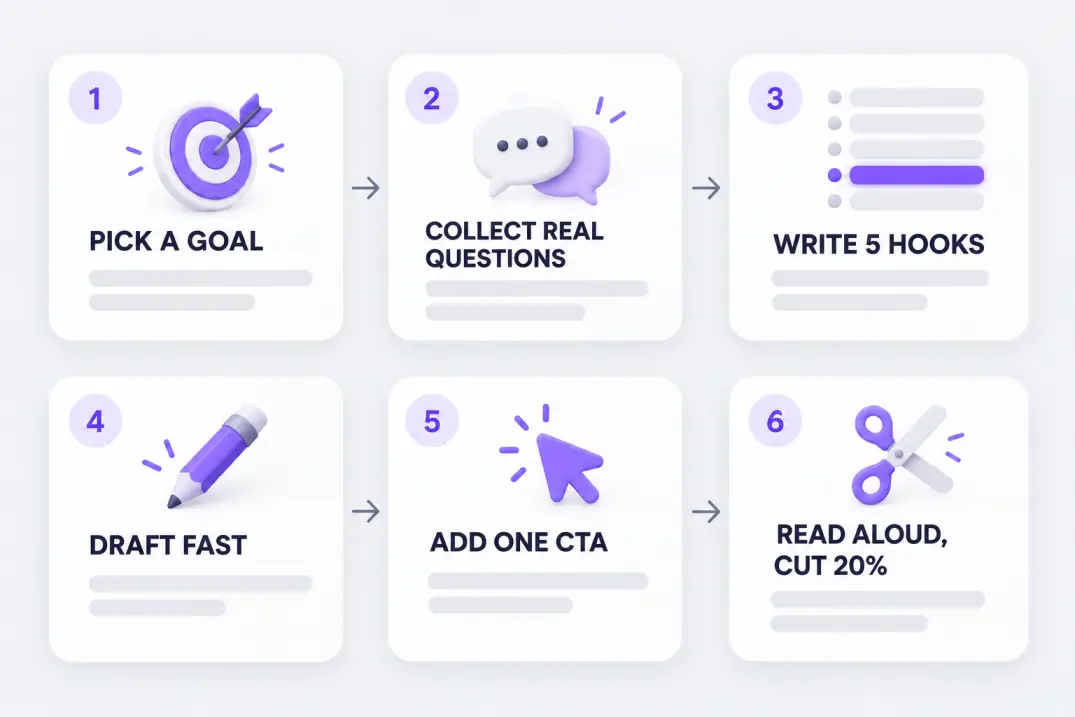
- Pick one goal. Comments, saves, shares, clicks, or replies. Choose a single winner for this post.
- Collect raw material. Pull real questions from your comments, DMs, and customer emails. Real language beats invented language.
- Write five hooks. Yes, five. The fifth is often better than the first, and choosing among options is easier than staring at one.
- Draft the body fast. Tell the story or give the tip without editing yourself. Polish comes later.
- Add one CTA. Match it to the goal from step one.
- Read aloud and cut 20%. If a phrase makes you cringe out loud, cut it. If a sentence doesn't earn its place, cut it.
Batch the work. Set aside one hour a week, write a week of captions in one sitting, and schedule them. Batching removes the daily decision fatigue that makes captions feel harder than they are. It is also the backbone of any serious approach to Instagram caption writing, because consistency compounds far faster than occasional brilliance.
Before and After: Five Caption Rewrites
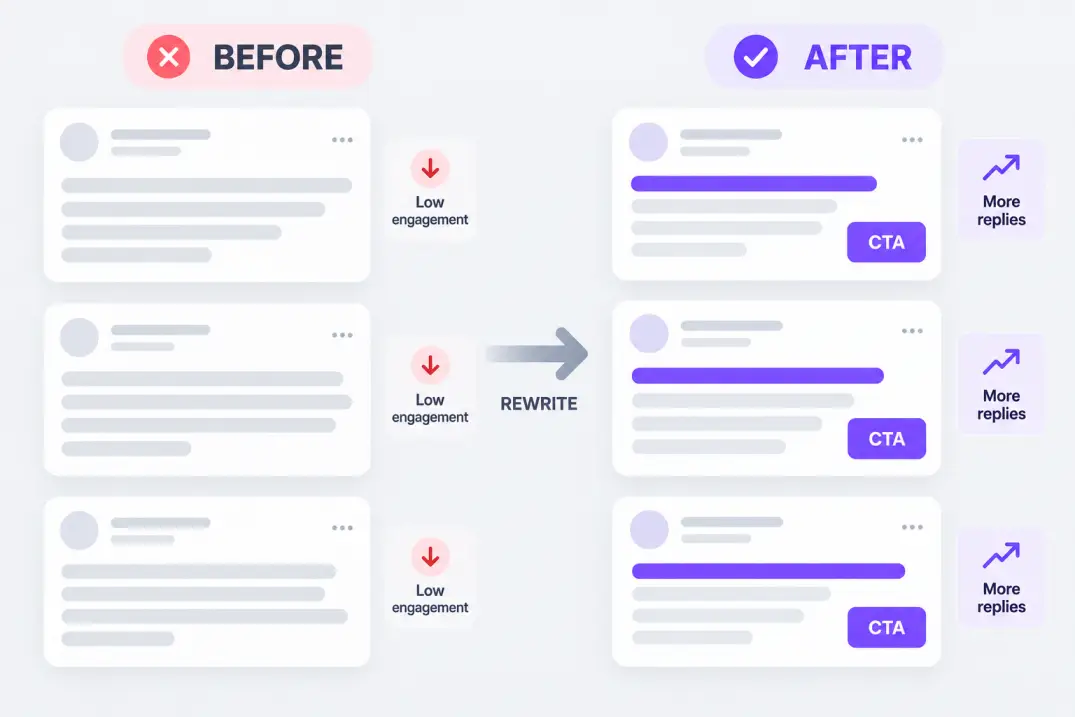
Seeing the difference makes the formula concrete. Here are five common captions, rewritten with a stronger hook, a sharper point, and a real call to action.
| Before | After | Why it works |
|---|---|---|
| “New blog post is live. Link in bio.” | “We tested 12 headlines. Only one won, and it wasn't ours. Full breakdown, link in bio.” | Adds a hook, a curiosity gap, and a reason to click |
| “Happy Monday everyone!” | “Monday question: what's one thing you're finishing this week? Reply and I'll cheer you on.” | Swaps a greeting for an invitation to respond |
| “Our new product is here.” | “Built for people who hate complicated apps. Try it free for 7 days.” | Leads with the reader's problem, not the announcement |
| “Great team event today!” | “Our support team spent the afternoon reading customer notes out loud. Here's the one that made us tear up.” | Replaces a generic update with a specific story |
| “Check out our sale.” | “48 hours, free shipping, and every size is back. Comment ‘SHIP’ and we'll DM you the link.” | Adds urgency, specifics, and a single easy action |
Notice the pattern. Every “after” is more specific, more human, and asks for exactly one thing.
101 Social Media Caption Examples You Can Steal
Use these as starting points, not scripts. Swap in your own details, keep the structure, and keep the specific bits specific. If an example doesn't match your voice, adjust the vocabulary until it does. Every group below uses a different pattern, so you can mix and match.
Hook-First Captions
- “Nobody tells you this about your first year in business.”
- “I almost deleted this post. Here's why I didn't.”
- “Three words changed how I plan my week: no meetings Wednesday.”
- “Stop scrolling if your Monday feels like a Thursday.”
- “The cheapest upgrade to your morning routine costs $0.”
- “You're not lazy. Your system is broken.”
- “We tested 12 headlines. Only one won, and it wasn't ours.”
- “The mistake I made for two years (so you don't have to).”
- “Quick question before you scroll: when did you last log off?”
- “Here's the plot twist nobody saw coming.”
Question and Engagement Captions
- “Coffee or tea? Defend your answer below.”
- “What's one small win you're proud of this week?”
- “Which one would you pick: sunrise hike or sunset beach?”
- “Tell me your most-used app without saying its name.”
- “If you could master one skill overnight, what would it be?”
- “What's the best advice you ever ignored?”
- “Weekend plans: rest, adventure, or chaos? Vote below.”
- “Drop an emoji that describes your week so far.”
- “Team early bird or team night owl?”
- “Finish the sentence: ‘I never leave home without…’”
Storytelling Captions
- “Three years ago I sold candles from my kitchen table. Last week we shipped order number 10,000.”
- “The customer email that made our whole team stop and read twice.”
- “I missed the train, took a wrong turn, and found my favorite café.”
- “Our first prototype fell apart in ten minutes. This is the fixed one.”
- “My grandmother's recipe card is stained, faded, and priceless. Here's what she taught me.”
- “We were two weeks from closing. Then one message changed everything.”
- “Day 1 of learning to surf: humbling. Day 30: still humbling, but smiling.”
- “I quit my job on a Tuesday and started this on Wednesday.”
Educational and Tip-Based Captions
- “Save this: 3 ways to make your photos brighter without editing apps.”
- “Pricing tip: charge for the outcome, not the hours.”
- “The 20-20-20 rule for tired eyes: every 20 minutes, look 20 feet away for 20 seconds.”
- “Beginner mistake #1: buying gear before learning the basics.”
- “Here's how to read a nutrition label in under a minute.”
- “Your resume needs numbers. Swap ‘managed a team' for ‘led 8 people to 40% faster delivery.'”
- “One habit for better sleep: no screens 30 minutes before bed.”
- “Swipe for a 5-step checklist to plan a month of content in one hour.”
- “Myth: you need to post daily. Truth: you need to post consistently.”
- “Bookmark this budget rule: 50% needs, 30% wants, 20% savings.”
Funny and Relatable Captions
- “My plans for the weekend: cancel plans.”
- “Adulting is just googling how to do things with confidence.”
- “Me: I'll go to bed early. Also me at 1 a.m.: one more episode.”
- “I came for the snacks and stayed for the snacks.”
- “Currently negotiating with my alarm clock.”
- “Iced coffee in winter? Absolutely. I have no regrets.”
- “Taking my dog on a walk, or he's taking me. Unclear.”
- “Meeting that could have been an email: the sequel.”
- “My calendar says productive. My couch says otherwise.”
- “Cooking dinner is easy. Deciding what to cook is the real workout.”
Product and Promotion Captions
- “Meet the new Everyday Tote: fits a laptop, a lunch, and your whole personality. Link in bio.”
- “Back in stock and probably not for long. Tap to shop.”
- “Our spring menu is here. Reserve your table before Friday.”
- “Free shipping this weekend only. Comment ‘SHIP' and we'll DM you the link.”
- “Before: dull and dry. After: glowing in two weeks. See real results in our Stories.”
- “Built for people who hate complicated apps. Try it free for 7 days.”
- “Three reasons customers reorder every month (number two surprised us).”
- “Only 20 spots open for our next workshop. Save your seat today.”
- “Gift idea: a handwritten card plus a mini plant. Ships in 24 hours.”
- “You asked, we listened. Meet the version with a bigger battery.”
Behind-the-Scenes and Personal Brand Captions
- “Behind the scenes: the messy desk where every good idea starts.”
- “Packing orders at 7 a.m. with a playlist and too much coffee.”
- “What a ‘day in the life' really looks like (less glamorous, more spreadsheets).”
- “Meet Sara, who hand-stitches every label. Say hi in the comments.”
- “We rebuilt our homepage this week. Here's what changed and why.”
- “A peek at our studio before the big launch.”
- “The one tool I couldn't run my business without.”
- “Failure of the week: the photo shoot that ended in a rainstorm.”
Motivational and Quote Captions
- “Progress is quiet. Keep going anyway.”
- “Small steps still count. Today's step: show up.”
- “Start before you feel ready. Ready is a myth.”
- “Your only competition is who you were yesterday.”
- “Rest is part of the plan, not a break from it.”
- “Do it scared. Then do it again.”
- “Consistency beats intensity. Write that down.”
- “Someone out there needs what you're about to make.”
Short Photo and Lifestyle Captions
- “Golden hour, no filter needed.”
- “Found my happy place.”
- “Soft mornings and slow coffee.”
- “Chasing sunsets and skipping the small talk.”
- “Weekend mode: on.”
- “City lights and quiet thoughts.”
- “Good food, better company.”
- “Wandering without a map.”
- “Salt air and slow days.”
- “Quiet corner, big ideas.”
Professional and LinkedIn-Style Captions
- “Hiring taught me this: attitude is harder to train than skill.”
- “Our quarterly review had one surprise: customers care more about speed than features.”
- “Three lessons from shipping a product with a team of four.”
- “The best meeting I had this month lasted eight minutes.”
- “Feedback is a gift. Here's how we ask for it without making it awkward.”
- “We just crossed 1,000 customers. Thank you, and here's what we learned.”
- “A quick framework for saying no to good ideas so great ones can win.”
- “What I'd tell my younger self about managing people: listen first.”
Reels and TikTok Captions
- “Wait for the ending.”
- “POV: you finally found the shortcut.”
- “Watch this before you buy another planner.”
- “Try this in 30 seconds. Thank me later.”
- “Things I stopped buying (and don't miss).”
- “Day 7 of trying a new recipe every day.”
- “Duet this with your version.”
- “Save this for your next trip: 3 hidden spots.”
- “Comment ‘GUIDE' and I'll send you the full checklist.”
If you're wondering about a good sentence for a caption when a photo really does speak for itself, numbers 75 to 84 are your template: five words or fewer, one mood, no explanation.
Tools and Services That Help You Write Captions
You don't have to write every caption from scratch. Several tools and services can speed up the drafting stage, and each fits a slightly different workflow. Features and pricing change often, so check each provider's current details before committing.
| Tool or service | Best for | Worth knowing |
|---|---|---|
| Canva Magic Write | Drafting captions alongside your designs | Convenient if you already build visuals in Canva |
| Buffer AI Assistant | Rewriting, shortening, and repurposing posts inside a scheduler | Useful for adapting one caption across platforms |
| Hootsuite OwlyWriter AI | Generating caption ideas from a topic or link | Sits inside a full social management suite |
| Later | Scheduling with caption help built in | Strong on visual planning for Instagram |
| Sprout Social AI Assist | Editing tone and length for teams | Better suited to larger teams with approval flows |
| Jasper | Brand-voice-aware marketing copy | Helpful when several people write for one brand |
| ChatGPT or Claude | Brainstorming hooks and variations | Flexible, but needs clear instructions and a human edit |
| Copy.ai | Template-based short-form copy | Quick for first drafts and A/B variations |
Beyond software, you can also hire help. Freelance marketplaces such as Upwork and Fiverr list social copywriters, and social media agencies offer full caption writing, scheduling, and reporting. A freelancer is often a good fit for a brand voice you want to keep human, while an agency suits teams that need volume and reporting.
A quick note on quality: AI drafts are a strong starting point and a weak finish line. They tend to sound generic until a person adds a specific detail, a real opinion, and the small imperfections that make a voice believable. Our guide on editing AI content covers exactly how to close that gap.
One workflow worth borrowing is to mine your long-form content for caption material. Teams that publish articles through an autonomous pipeline such as Qoreta often pull hooks from those posts, since every well-structured article already contains a statistic, a claim, and a takeaway that can open a caption.
Common Caption Mistakes to Avoid
Most weak captions fail in the same handful of ways.
- Starting with “Happy Monday!” or “New post!” These waste your only visible line.
- Asking for five things. One CTA converts better than four.
- Writing for everyone. A caption aimed at “anyone interested in marketing” persuades no one. Pick a specific reader.
- Copy-pasting across platforms. The audience, length, and tone are different on every feed.
- Hiding the point. Make the payoff visible before the “more” cut-off.
- Overusing hashtags and emojis. They are seasoning. A dense wall of either hurts readability.
- Never checking the results. If you don't measure, you're guessing.
How to Tell If Your Captions Are Working
Likes are the weakest signal. Better ones include:
- Saves: the reader wants to come back to it, a sign of real usefulness.
- Shares: the reader thinks someone else needs it.
- Comment quality: replies that continue the conversation beat one-word reactions.
- Profile visits and follows: the caption made someone curious about you.
- Link clicks and replies: the caption did the job of a sales page.
Test one variable at a time, such as hook style or CTA type, and give each test at least two weeks of posts before deciding. Keep a “swipe file” of your best-performing openers and reuse the pattern, not the exact words.
For deeper benchmarks on what to track, the Sprout Social insights library and the Hootsuite blog publish regularly updated social media research.
Final Thoughts
Now you know how to write engaging social media captions without relying on luck. Lead with a hook that earns attention, add context and value that respect the reader's time, write in a voice that sounds like a person, and ask for exactly one thing at the end.
Start small. Rewrite your last three captions using the formula, pick five examples from the swipe file above, and schedule a week of posts in one sitting. The first batch will feel slow. By the third, you'll notice that the words underneath your photos have quietly become the strongest part of your content.
Artificial Intelligence
Intelligence without limits.
We believe great content deserves honest authorship—even when it's AI.
Frequently Asked Questions
Match length to the idea, not a fixed number. A strong photo can carry five words, while a lesson or story might need a few hundred. What matters most is that the first line or two works on its own, since that is what most platforms show before the 'more' cut-off.
A reliable structure is hook, context, value, and one call to action. The hook wins the first line, context ties the words to the visual, value gives the reader a reason to stay, and the CTA tells them exactly what to do next.
Start with real material: questions from your comments, DMs, and customer emails. Then write five different hooks for the same post and pick the best. Working from real language and choosing between options is easier than waiting for inspiration.
Most captions work best with the main CTA at the end, once the reader has enough context to act. If your post is time-sensitive, you can add a short early nudge in the hook, but keep the final ask to a single action so it stays clear.
In moderation, yes. A single emoji can act as a visual bullet or signal tone, which helps scanning. Long strings of them make text harder to read and can be awkward for screen readers, so use them as seasoning rather than structure.
Fewer, more specific tags generally serve you better than a long generic block. Choose a handful that describe the post's real topic, and put your important keywords in the sentence itself. Platform guidance on hashtags changes, so check current rules inside the app.
Yes, as a drafting partner. AI is good at generating hook options and variations quickly. Add a specific detail, a genuine opinion, and your usual phrasing before publishing, or the result will sound like everyone else's.
Write a short voice note describing how your brand talks, three adjectives that fit it, and words you would never use. Keep it beside your scheduler and check each draft against it. If several people write captions, share example posts that nail the voice.
Keep it very short and mood-driven, such as 'Golden hour, no filter needed.' Aim for five words or fewer, one feeling, and no over-explaining. Let the image carry the story and let the words add a small detail or tone.
They can. Engagement from comments, shares, and saves is influenced by how compelling your text is, and descriptive wording gives platforms and search engines a clearer picture of your topic. Public Instagram posts can also appear in search engine results, so clarity helps discovery.
Test one variable at a time, such as hook type or CTA wording, and run each test for at least two weeks of regular posting. Changing several things at once makes it impossible to know what caused a difference.
Adapt them, yes. Keep the core idea, but change the hook, length, and tone to suit the audience's expectations. A LinkedIn version might lead with a lesson, while the TikTok version leads with a short, searchable line that reinforces the on-screen text.
A caption is visible text that frames your post for all viewers and drives engagement. Alt text is a hidden description that screen readers announce so people who cannot see the image understand it. Good posts use both, and they should not simply duplicate each other.
Pick a short line, either original or properly credited, and place it on a clean, high-contrast design using a tool like Canva. Keep the text large enough to read on a phone. Then use the caption to add context, such as why the quote matters to you, and finish with one question.
Treat the on-screen text as the primary hook and the caption as reinforcement. Use the caption to add searchable keywords, a one-line reason to watch to the end, and a single CTA. For accessibility, also add on-video subtitles where the platform allows it.
Avoid empty openers like 'Happy Monday' or 'New post' as your only visible line, vague filler such as 'game-changer,' and stacked CTAs. Also avoid claims you can't back up. Specific, plain wording almost always outperforms hype.
Look beyond likes. Saves, shares, comment quality, profile visits, and link clicks tell you far more about whether the words did their job. Track them per post, compare by hook or CTA style, and reuse the patterns that consistently win.